Logical replication slots are vital for data integrity in downstream systems. By blocking cutovers until slots are synced, PlanetScale prevents silent data loss in CDC pipelines, ensuring high availability doesn't compromise consistency for external analytics or search indexes.
Reliability is kinda our whole thing at PlanetScale. We maintain a flawless uptime record and preach the gospel of high availability. It might seem counterintuitive, but this involves embracing failure.
A resilient system anticipates the server failures inherent to cloud-native environments.
Most stuff in your primary database makes its way into its replicas without issue. The write-ahead log (WAL) streams updates from the primary to replicas, so after a brief moment (replication lag), the databases are effectively the same.
In the event of a resize or configuration change, a replica that is an exact match of the primary is "promoted" to become the new primary. The only penalty is a few seconds of primary unavailability and dropped connections (except to PgBouncers).
Most commonly, you might think that a replica is promotion-ready because it has replayed WAL to completion. A less obvious condition is whether the replica has a synchronized, usable copy of logical replication slots.
In vanilla Postgres, you can proceed with a promotion even if replication slots aren't caught up, potentially breaking your connected applications.
On PlanetScale Postgres, we'll block you. It's for your own good.
Postgres contains two types of replication slots, which act as "bookmarks" in the WAL.
This post is concentrated on the latter. Postgres is designed to be okay with replica promotion so long as the data is caught up, but with no concern for whether logical slots exist on the replica.
Without a copy of that bookmark on the promoted replica, the database is fine, but the change stream is not. Consumers of that slot miss every event since they last acknowledged one, or they stall until you take a new snapshot. Promoting an incomplete replica to primary is a data-loss event for your downstream applications.
It's helpful to put a box around PlanetScale and Postgres and define their roles and responsibilities in creating a seamless cutover experience.
Click on any of the boxes in the diagram below for more details
Postgres provides a lot of functionality to create a high-availability architecture. It understands the concept of a primary and replicas, and the WAL allows the former to stream updates to the latter, keeping their data synchronized.
(Note: What PlanetScale calls replicas, Postgres documentation calls standbys. The additional layer of confusion this adds to writing about replication slots is not lost on the author of this post.)
Postgres can report a replica's current state, including whether it's connected, how far through the WAL it is, replication lag, and more.
Postgres won't provision servers, decide which replica to promote, or decide whether a replica is ready for promotion. The operator makes these decisions.
The joy of PlanetScale Postgres is its custom Kubernetes operator, which, among other things, makes critical operations like resizing, reconfiguring, or reviving a database from failure much safer.
In relation to logical replication slots, it will:
pg_replication_slots and records any misconfigurations such as missing failover = true or whether hot_standby_feedback or sync_replication_slots are off. The next section covers the correct configuration.synchronized_standby_slots so one dead replica doesn't block all logical replication.If you take no action, we will allow blocked cutovers to proceed after the grace period. However, you risk downstream consumers missing updates with no trustworthy position from which to resume.
This blog post isn't a full guide to setting up replication slots; it just highlights how to do it correctly on PlanetScale.
Say you're creating a slot called analytics_cdc. The last parameter matters most: it ensures the slot stays in sync with replicas. You must set failover = true. Double-check any implementation code from your CDC tooling.
SELECT pg_create_logical_replication_slot(
  'analytics_cdc',
  'pgoutput',
  false, -- temporary
  false, -- two_phase
  true   -- 👈 failover
);
If you already have a replication slot with failover = false, you can modify it, just be aware this will hang if the slot is already being consumed. In a separate session you'll have to terminate th consumer to apply this change.
ALTER_REPLICATION_SLOT analytics_cdc (FAILOVER true);
If you haven't already updated your database configuration for replication slots, you should soon receive an email from PlanetScale notifying you that changes are required, and you'll see a new banner in the dashboard.
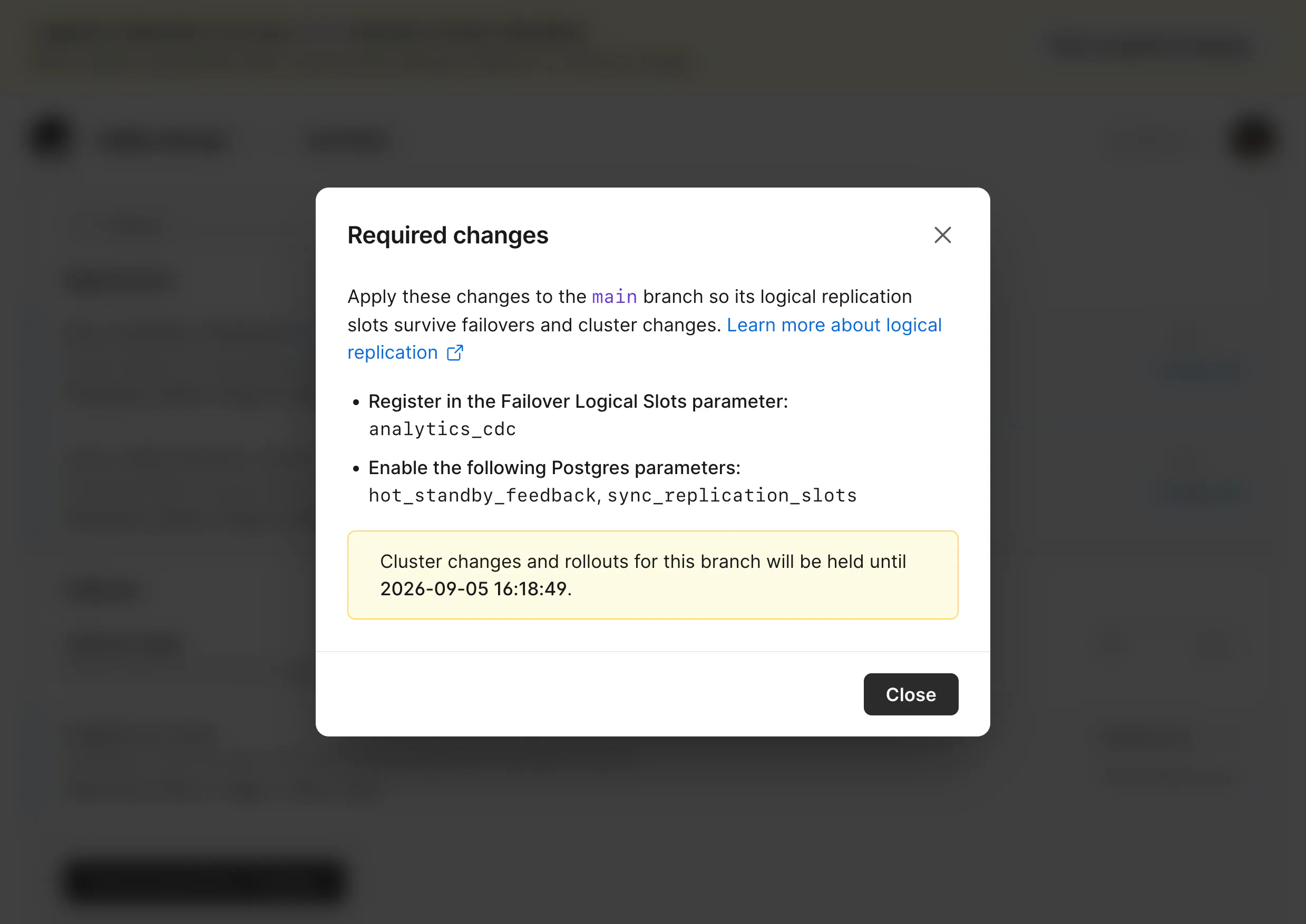
Setting failover = true in the replication slot makes it sync to replicas, but doesn't ensure it's promotion-ready. PlanetScale needs to know the name of any replication slots your applications depend on to ensure they won't be deleted from the replica before promotion.
You can add the names of all required slots in the dashboard under Clusters > Parameters > Logical slot name.
Repeat this step for each new slot you add to your database. Thankfully, you'll also receive an email reminder for each one.
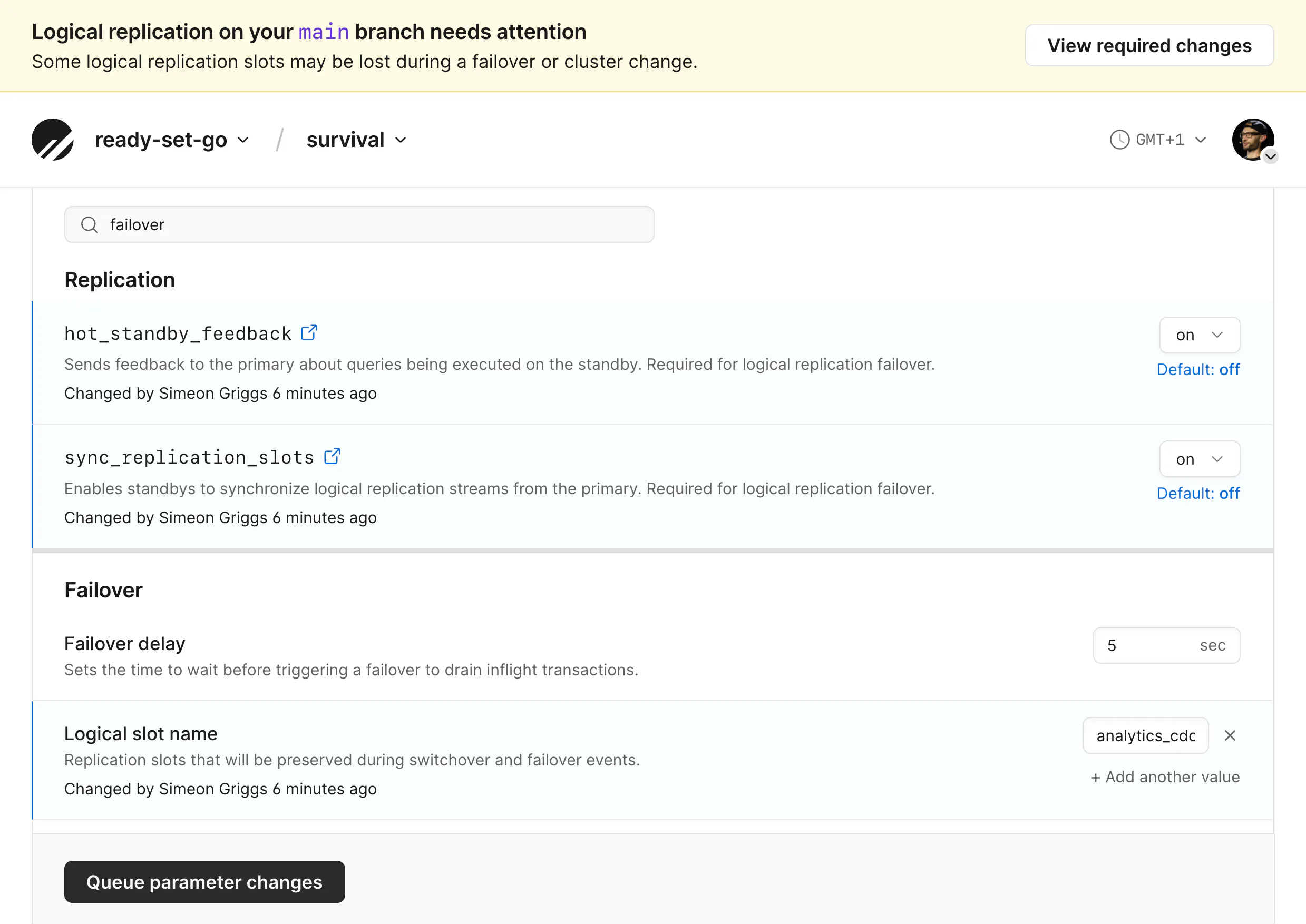
Additionally, you'll need to set two Postgres settings to on in your parameters configuration.
hot_standby_feedback = 'on' keeps that bookmark copy valid so it can be used after promotionsync_replication_slots = 'on' instructs Postgres to copy slot state to replicasThis is a one-time operation that will cover all replication slots.
With this done, your replicas and their replication slots are cutover-ready.
Setting these two parameters to off is the perfect default for a database with no CDC consumers. Some folks believe they should be on by default. Since you're using logical replication slots, you need both on, but it's worth knowing the consequences.
hot_standby_feedback determines if a replica tells a primary which old rows it is still reading. The off default means a replica cannot pin the primary's vacuum horizon, while on deliberately pins that vacuum for correctness, but at the cost of adding bloat to the primary. Be aware, long-running transactions against replicas can cause problems with this enabled.sync_replication_slots is the worker that copies slot state onto replicas. Turn it on without hot_standby_feedback and the copy can be invalidated the first time vacuum runs past the slot's horizon.Most databases never create a logical slot, so Postgres' defaults assume you're better off without the extra work that these introduce.
While Postgres understands high-availability architecture, its default behavior doesn't have downstream applications' best interests in mind. The combination of what Postgres can do and what PlanetScale lets you do saves you from finding that out the hard way.
Continue reading on the original blog to support the author
Read full articleThese updates bridge the gap between traditional Postgres and distributed sharding. With read-only replicas, Azure support, and massive performance boosts to bulk writes, Neki offers a scalable path for Postgres workloads without sacrificing SQL compatibility or developer experience.
This expansion allows Azure-based teams to utilize PlanetScale's managed database features with low latency. The technical implementation highlights sophisticated Kubernetes networking strategies to overcome cloud provider IP limitations at scale.
This feature allows engineers to scale read-heavy Postgres workloads globally while isolating specialized tasks like analytics or vector search. By providing independent resource tuning for each replica, teams can optimize performance and costs without impacting the primary database.
Sharding strategies that work at launch often fail under scale. Understanding how to migrate from tenant-based sharding to more granular keys is crucial for maintaining performance and enabling features like cross-tenant communication without incurring application downtime.
