Query planner instability can cause catastrophic outages without any code changes. Understanding how to isolate and throttle rogue queries is essential for maintaining high availability when database statistics shift and execution plans degrade.
Everyone’s least favorite alert: nothing changed, everything is on fire.
No new deploys, no database failovers, no spike in client query load or inbound requests. Yet suddenly, the database CPU has jumped from 20% utilization to 100% and queries are starting to fail.
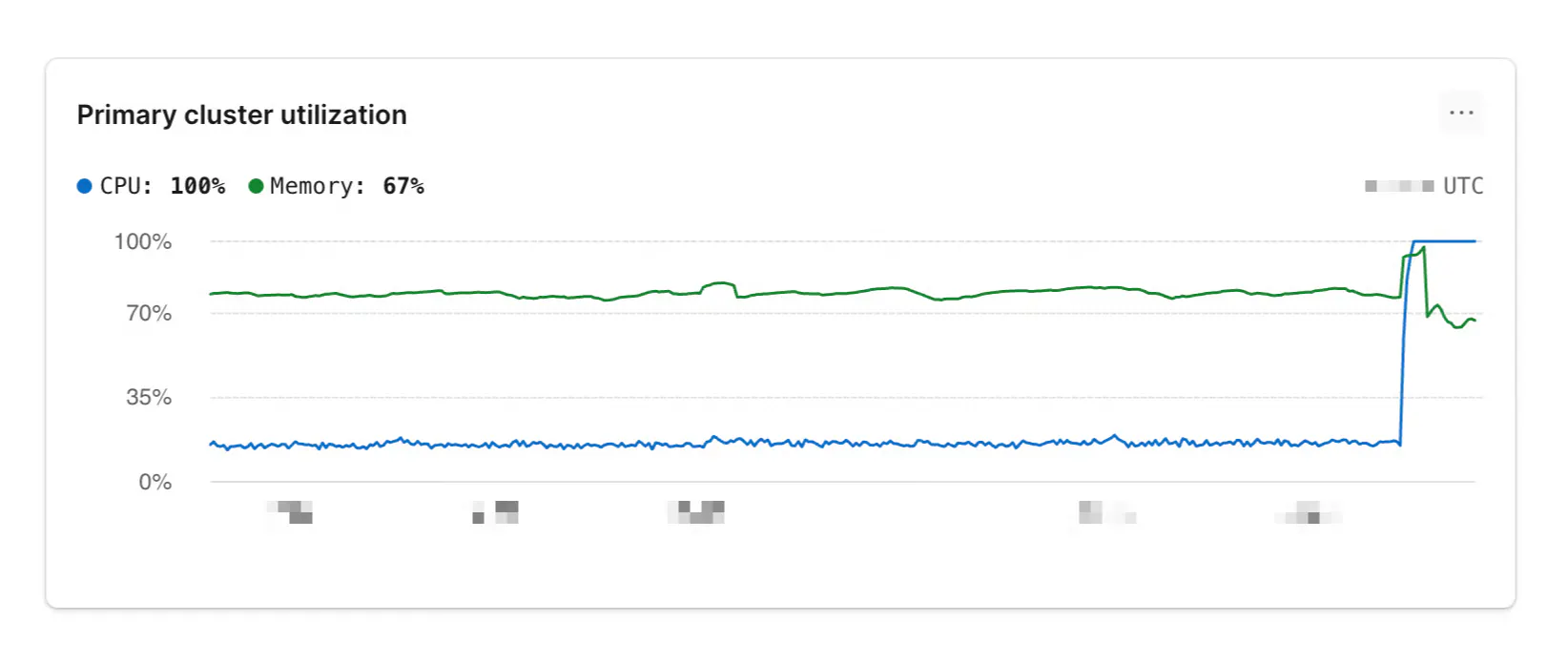
This is precisely what a customer of ours faced last Thursday. Turns out the root cause is the fickle PostgreSQL query planner, and the solution is Database Traffic Control®. Let’s dig in.
When our customer notified us of this unexpected CPU spike, both companies began digging in immediately. Frustratingly, it looked like nothing had changed on our end, and they confirmed nothing changed on theirs.
After digging into their query patterns with PlanetScale Insights, we narrowed down the problem to a single query pattern that was taking almost 50% of the total runtime on the cluster, which had suddenly gotten a lot slower. The graph below shows the query latencies correlated with the CPU spike:
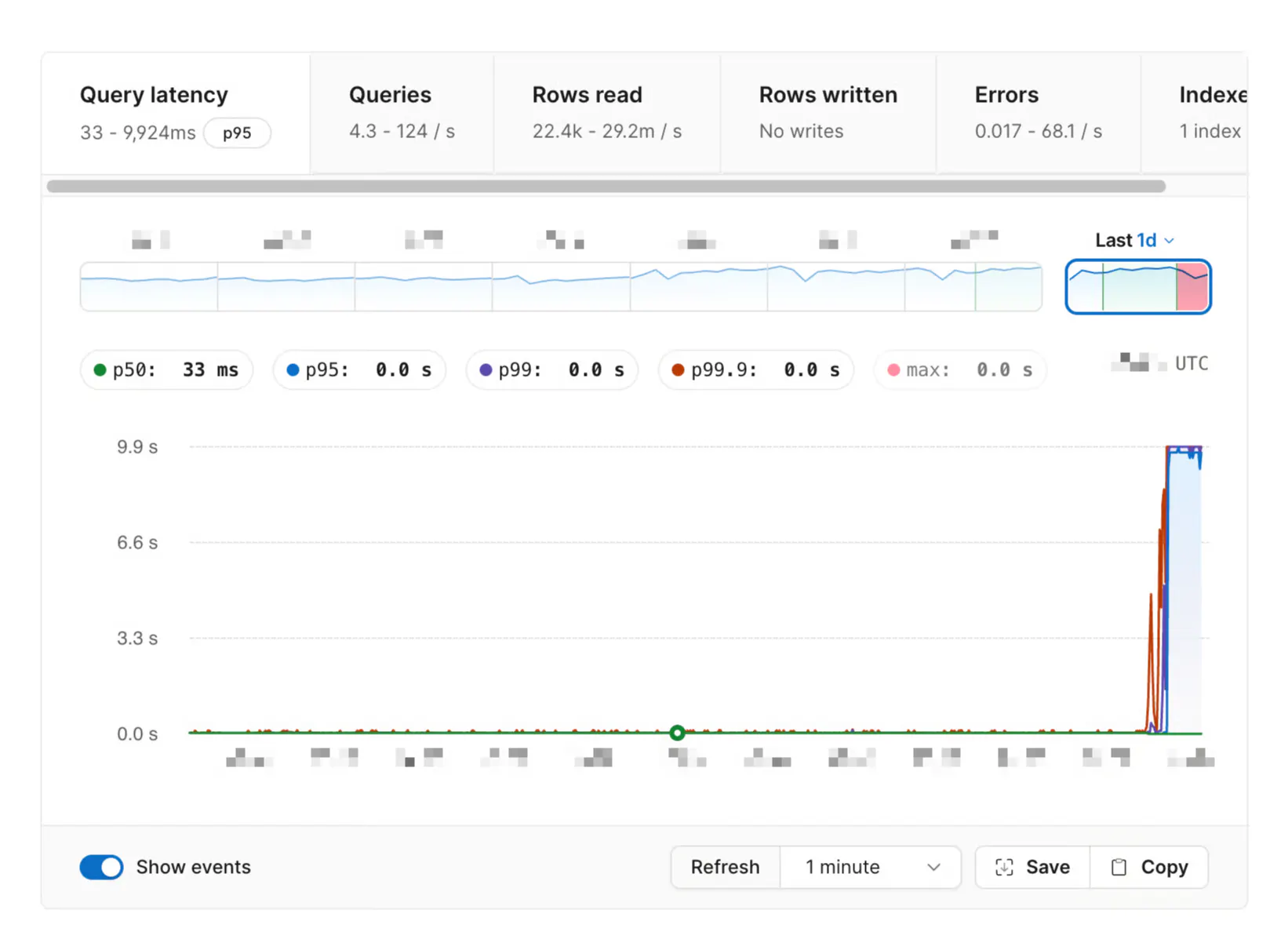
Though query volume was unchanged, we can clearly see that query latency went from milliseconds to ~10 seconds, which was their configured query timeout.
Before doing anything else, the customer asked: “can we ban the query with traffic control to get everything else back to baseline?”
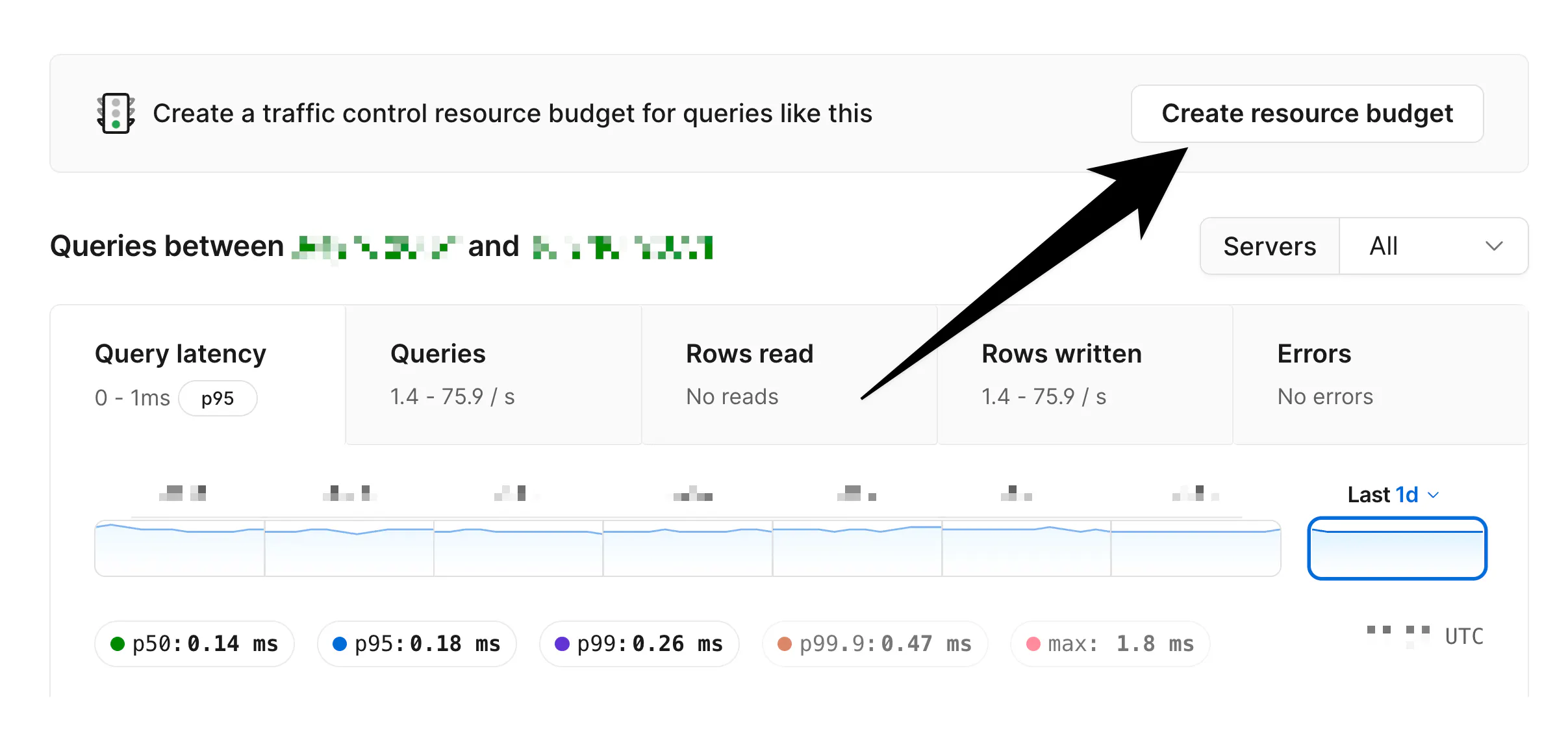
With the click of a few buttons, they applied a strict traffic control resource budget for this exact query pattern, set it to enforce mode, and PlanetScale immediately began preventing further executions.
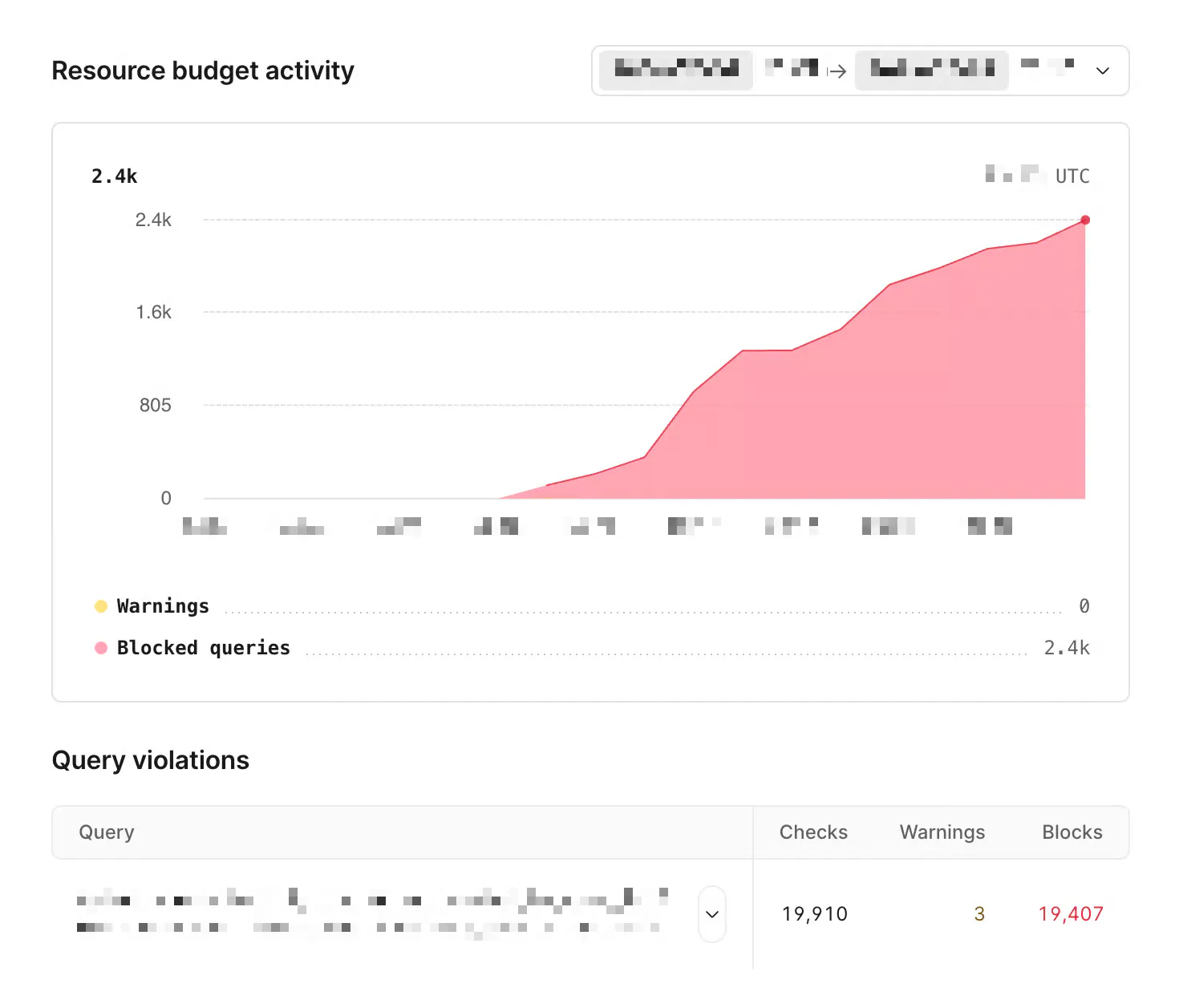
The red here indicates the volume of queries killed over the ~15 minute period after the budget was put in place.
The database immediately began to recover. After working through a backlog of queries and connections built up from the resource contention, things returned to normal.
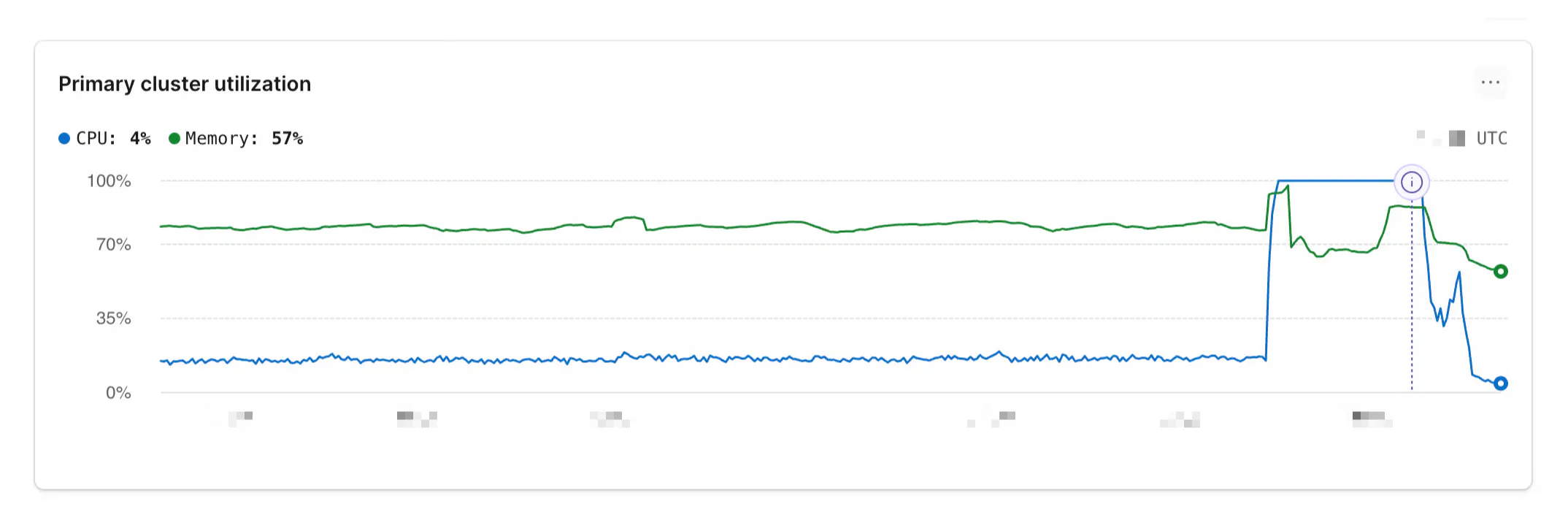
With a few clicks, the customer went from a nearly unusable database pegged at maximum resource usage to a healthy one. Traffic Control continued to kill all instances of the dangerous query until the customer had time to investigate and fix the root cause.
This is all great, but why would a query suddenly start misbehaving?
Every query executed on Postgres must first be planned. After parsing the SQL text, Postgres makes a plan for how a query will be fulfilled. This step estimates the cost of an index scan vs sequential scan, chooses which index(es) to use, selects the join strategy, and more based on internal data and schema statistics. It uses these calculations to derive a plan, which then gets executed.
99.99% of the time, Postgres makes a good choice and executes each query with a (near) optimal plan. However, the statistics Postgres uses to derive plans evolve as data grows, even when application code and schema do not.
In rare scenarios, the planner makes a sudden decision to stop using an index. A query that was happily using one and running at millisecond latency abruptly starts skipping the index, doing full table scans, and consuming all available CPU resources.
That's what happened here.
Traffic control restores database health, but blocking the query is a temporary measure. The next step is to compare the query’s old and new execution plans using EXPLAIN (ANALYZE, BUFFERS) in a safe environment.
Depending on what changed, a longer-term fix could include running ANALYZE to refresh stale table statistics, adding or adjusting existing indexes, or rewriting the query so Postgres can use an index effectively.
In this incident, Database Traffic Control was used to apply a budget to a specific bad query and immediately begin killing all of them.
This is only one of many ways it can be used to keep a database healthy. You can create custom resource budgets across all of your database traffic, categorize it in whatever way you like with sqlcommenter tags, and precisely manage which queries are allowed to utilize which resources.
Continue reading on the original blog to support the author
Read full articleWhile convenient, ON DELETE CASCADE introduces hidden operational risks like lock contention, WAL bloat, and accidental data loss. Understanding these failure modes helps engineers design more resilient database schemas and avoid production outages during routine migrations or deletions.
These updates bridge the gap between traditional Postgres and distributed sharding. With read-only replicas, Azure support, and massive performance boosts to bulk writes, Neki offers a scalable path for Postgres workloads without sacrificing SQL compatibility or developer experience.
This expansion allows Azure-based teams to utilize PlanetScale's managed database features with low latency. The technical implementation highlights sophisticated Kubernetes networking strategies to overcome cloud provider IP limitations at scale.
Understanding TOAST is crucial for database performance and storage optimization. As Postgres 19 shifts to LZ4 by default, engineers must understand how compression thresholds and storage strategies affect row density and query latency in large-scale production environments.
