
Check out pull request stacks anywhere you commit code on GitHub, and stacked sessions in the GitHub Copilot app >
Stacked sessions solve the 'one-shot' failure problem in AI coding by allowing complex refactors to be broken into dependent tasks. This enables engineers to modernize legacy systems incrementally while maintaining architectural consistency across multiple pull requests.
I want you to look at this screenshot for a moment from the GitHub Copilot app. It’s a small one, it’s got a lot of icons, and it tells the most glorious story that I’m really excited about.
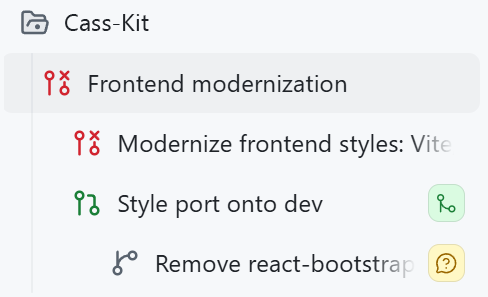
This image is a set of stacked sessions. They’re a series of tasks in the same repository, where each session builds off each other!
More on those below, but first, why is this screenshot so magical? We need to go back more than a decade to start. I have this very old repo of mine for a personal app. I first made it ages ago (end of 2014-ish), and it’s done what I want it to do (it’s like a personal “life” dashboard of calendars and smart devices in my home and task management) for all those years. I occasionally do some updates, but those have gotten harder and harder to wrangle.
My dependencies had gotten old. Embarrassingly old. I was using React 15 (which was released in 2016), Less for CSS pre-processing, and a version of react-bootstrap from around that time. Yes, you read that right. Bootstrap. This was old.
Trying to untangle this absolute mess before AI would have taken me weeks. I had tried and given up before. It’s not the largest app in the world, but it’s juuuust big enough that it would be painful, and the juice was simply not worth the squeeze.
…but we do have AI now, and so I fired up the GitHub Copilot app, added the repo, and got started.
No.
I tried though! This is the prompt that I used in Plan mode:
I want to modernize the frontend for this project. I first wrote a lot of this code more than 10 years ago and it should be cleaned up a lot. I'm thinking we start either using Tailwind or just vanilla CSS (please vet everything to help me decide), we remove all Less (etc), and clean everything up accessibility-wise and responsiveness-wise. Right now I really want to just focus on styles, and then slowly but surely organize and consolidate the React functionality. It might be worth modernizing dependencies, too. Let's come up with a plan around this before diving in.

1. Nothing is sacred, it's okay if we have to completely start over some parts
2. Links should change colors and add underlines on hover/focus
3. Input boxes should have a smaller border radius in general, and their labels should be cleaner
4. There should be good wrapping and a max-width on containers so that an input box doesn't span an entire wide monitor.
I passed this into Claude Opus 4.8 got a Rubber Duck review from GPT-5.5, and had to do quite a bit of back-and-forth to make decisions. Once I got to a place I was happy with, I hit “go” and let the app go to town on my project to see if it would work!
…it didn’t, and it was my fault.
So, remember when I said I’d “tried and given up before?” Turns out, I actually had an old devbranch where I actually had modernized some parts, and didn’t realize the compatibility issues I’d run into.
But, that was a good thing!
When I ran the new version from this session, I realized that I was branching off main, but that my current deployment that I was using regularly was using my partially updated version on dev. So, some wanted features that I had made for myself needed to be included in this set of changes. But, the changes were just big enough that I actually had to apply those changes to the devbranch to save my sanity a bit, rather than pull in the devchanges to main.
Pre-AI… my word, this would have made me pull my hair out in frustration. I was admittedly frustrated here, too. I had spent time and tokens trying to get this running with what I thought was a decent plan. But! I was able to switch gears (and sessions) with a simple ask, which was way cooler than I expected it to be:
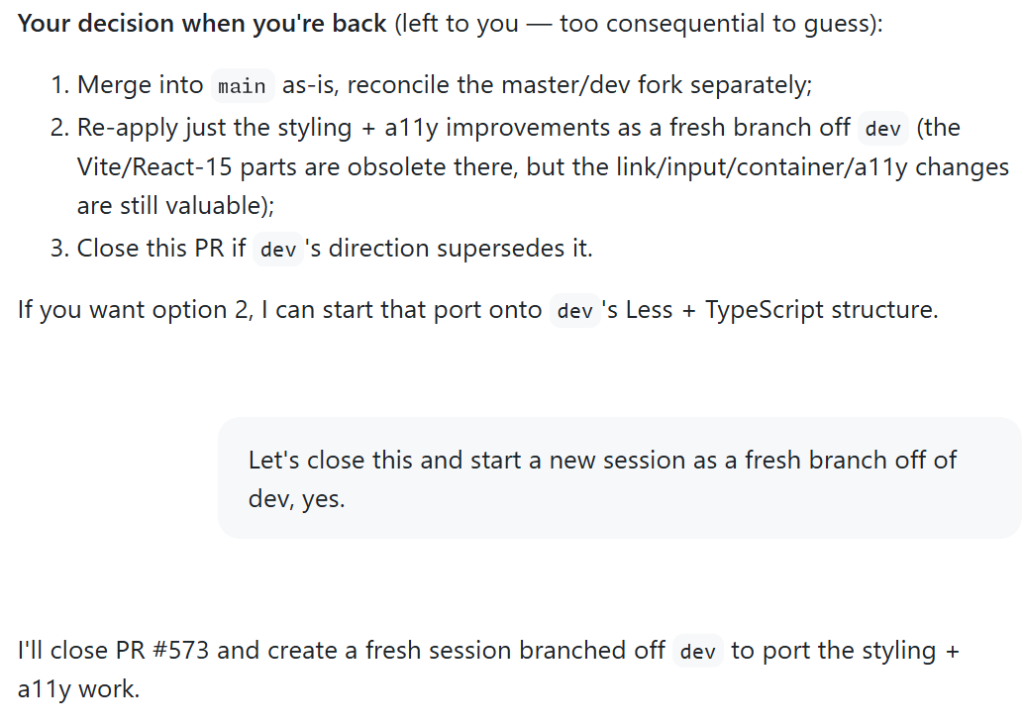
All was not wasted! Copilot made a new session for me, closed the pull request I had attempted, and ported my styling decisions to changes it was applying to the dev branch.
Whew, okay, so I had a good branch going, and a pull request I was decently happy with. As I started testing, though, I couldn’t help but notice some old warnings in my console.
My heart filled with dread as I saw old references to findDOMNodeand componentWillReceiveProps, functions I personally hadn’t touched in years and years. Ugh.
Those references were not in my codebase as much anymore, but they were in react-bootstrap. I opened up Plan mode again, because I needed to figure out if an upgrade would work, or if I should remove the library entirely:
Do you think we should remove react-bootstrap entirely (and replace with a modern alternative), or just upgrade/migrate existing components?Running this gave me a decent plan, talked through the options, and recommended replacing the library entirely.
I needed to make sure my changes were safe from the existing work, but the react-bootstrap replacement felt like a lot of scope creep for what I was currently doing.
I’ve found that in a lot of my “agentic” engineering work, it’s particularly hard to avoid that kind of scope creep. Because I don’t have to write all the code myself, it’s so tempting to make 10,000 line pull requests that take care of all of the things I want to do! Which is really just a new form of procrastination, ha.
So, instead of making this mega pull request for myself to test, I broke it up with a new session, and prompted:
Let's make a pull request for the existing work, and then start a new session for this react-bootstrap replacement work that will branch off this existing work here, and be a separate pull request to merge into dev after this one. This is the part that felt magical enough to make me want to write this blog post. The GitHub Copilot app:
devTHIS WAS SO COOL. Stacked sessions and stacked pull requests? Is this the future?
YES.
In case you don’t get what that means by name: A stack is a series of pull requests in the same repository where each pull request targets the branch of the pull request below it, forming an ordered chain that ultimately lands on your main branch.
In my case, not only did the sessions follow each other, but their changes did too!
I know I’m being somewhat cheeky with my excitement, but my happiness is sincere. The ease of shipping these changes was a delightful experience after neglecting my old codebase for ages.
Let’s look at that first screenshot again: I’ll walk you through it.
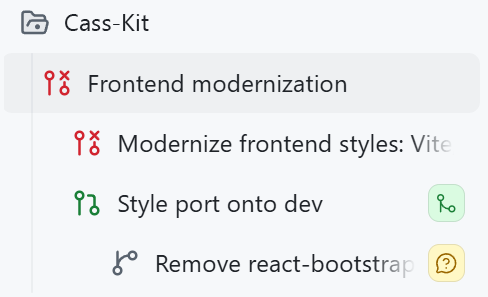
devbranch.Software development has never been smooth. But this project was made a whole lot easier with these modern tools.
If you’re looking to modernize your own codebases, give this a try!
Check out pull request stacks anywhere you commit code on GitHub, and stacked sessions in the GitHub Copilot app >
The post Stacked sessions and pull requests in the GitHub Copilot app appeared first on The GitHub Blog.
Continue reading on the original blog to support the author
Read full articleThis article highlights a shift from chat-centric AI to task-oriented interfaces. For engineers, this means better productivity through custom tools that reduce token costs and provide precise control over local environments and data without leaving the AI workspace.
Engineers often get distracted by AI gimmicks. This article highlights that productivity gains come from understanding the core agent harness and granting it autonomy in safe, sandboxed environments, allowing for faster prototyping and fewer manual interruptions.
This app shifts AI from a simple chat interface to a comprehensive workspace. By integrating context-aware agents, interactive UI previews, and automated PR management, it streamlines the entire development lifecycle from initial coding to final merge.
Improving accessibility in open source ensures a more diverse contributor base and better software for everyone. By providing tools and documentation, GitHub helps engineers build inclusive projects and leverage assistive technologies in their development workflows.