This agent demonstrates how AI can scale accessibility compliance by automating the detection and fix of common WCAG violations. For engineers, it reduces manual review overhead and provides immediate feedback, ensuring more inclusive software reaches production faster.
It is an understatement to say agents have become a popular way of working with code. GitHub has adopted agent-based code creation and editing for many of its initiatives, including piloting an agent to help with our commitment to accessibility.
GitHub is currently piloting an experimental general-purpose accessibility agent to achieve two main goals:
For purpose number two, the accessibility agent is set to automatically evaluate changes that modify our front-end code.
To date, the agent has reviewed 3,535 pull requests, with a 68% resolution rate. In order of occurrence, the top five issue types center around:
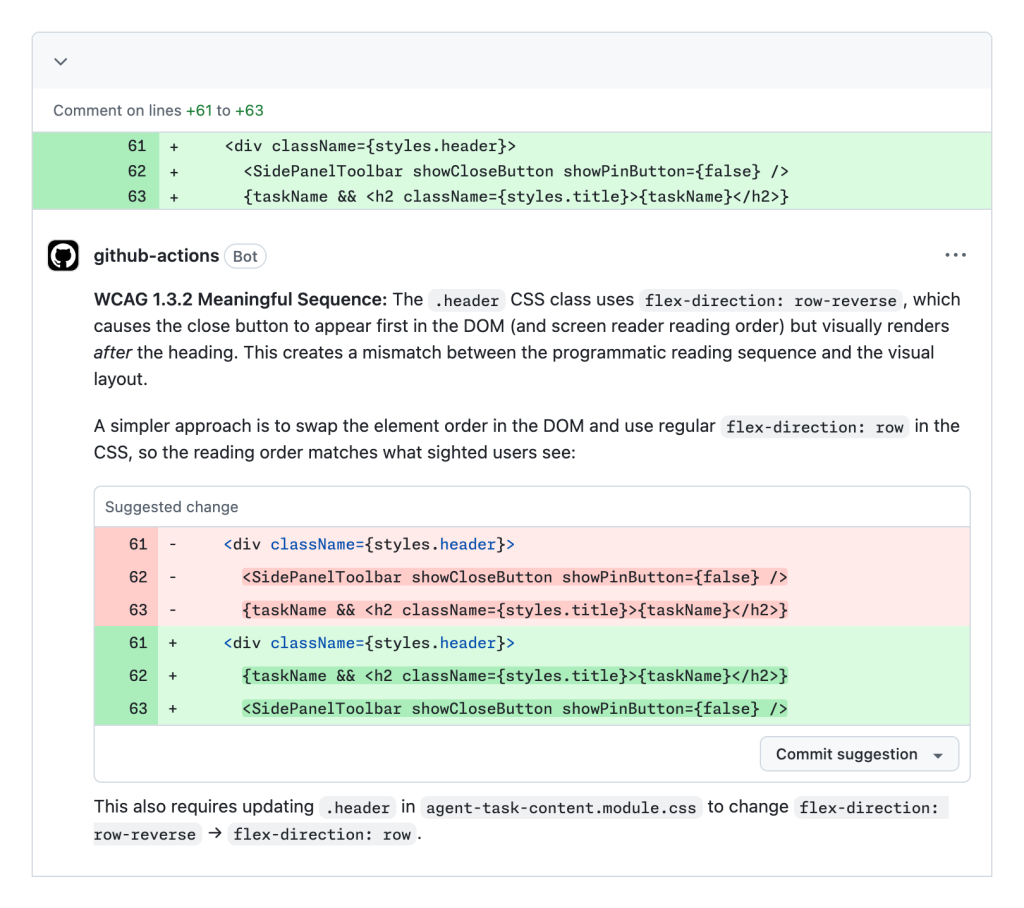
Each of these issue types represents friction and barriers automatically removed that would have otherwise inhibited use of GitHub for people who use and rely on assistive technology. Here’s a screenshot of it in action:
Interested? We’ll be outlining successes and lessons learned with this experiment, with the hopes that it can help with other teams’ accessibility journeys.
The social model of disability teaches us that access barriers—and consequently impairment—can be created because of how an environment is built. The same thinking applies to digital experiences.
With the accessibility agent, we are not attempting to “solve” accessibility in isolation. We are instead attempting to augment our peers’ efforts, to better help them remove the barriers that may be created as a result of how we construct GitHub’s user interfaces.
The accessibility agent is not a “silver bullet” that can automatically address every hypothetical scenario. Understanding, honoring, and socializing this better helps set the agent’s scope of responsibility. This sped up the experiment’s launch, leading to more buy-in for the effort.
The European Accessibility Act is now in effect. Title II of the Americans with Disabilities Act is set to establish meeting WCAG 2.1 AA as the legal definition of done in April of 2027. LLM agents can read and take action on the accessibility tree.
To say it plainly: Organizations will be at a disadvantage if they have not already invested in manually identifying and remediating accessibility issues. There are many reasons for this, including building an accessibility agent.
To that point, GitHub has a mature system in place for logging accessibility issues, as well as verifying fixes to issues are working as intended. This includes:
In addition, all the issues are centralized to a single repository. While this issue-logging effort predated the explosion in popularity of LLM tooling, its highly consistent and structured nature made it an ideal corpus of content for the accessibility agent to reference.
Because of this, we instructed the agent to investigate these issues to see if there are related code and language snippets it can extrapolate from. This is one area where the non-deterministic “fuzzy matching” behavior of LLMs acts as an asset rather than a possible liability.
Much like with any other specialized domain area, vague instructions in a skill file won’t cut it. Telling an LLM to “use accessibility best practices” with a short list of examples won’t work well.
When generating code, LLMs have an unfortunate bias towards producing accessibility antipatterns since every major LLM currently available is trained on decades of inaccessible code.
To counteract this, the agent needs better content to draw from.
So, I enthusiastically recommend investing in manually cataloging and remediating accessibility issues. After some progress, this data can be incorporated into the agent.
The issues and their corresponding pull requests provide highly contextual examples for the LMM to reference, written using the conventions set up by the organization it is deployed in. This collection of issues and code is by far one of the strongest assets the agent draws from.
Accessibility is a holistic concern, intersecting with code, design, copywriting, and numerous other disciplines involved with creating user interfaces.
A lot of accessibility work is also highly contextual, meaning that someone typically needs the full working picture of a problem before they’re able to give the appropriate advice for what to do.
Because of these two factors, a general-purpose accessibility agent can consume a ton of tokens when it performs work. This has three negative outcomes:
It’s important to be diligent when structuring the agent. Here’s how we went about doing just that.
The accessibility agent started as a single monolithic agent, but quickly grew past the limitations of this approach. Because of this, we evolved it to use a sub-agent architecture.
A lot of guides recommend creating a large suite of sub-agents, each with its own specific area of responsibility. Here, the sub-agents are executed in parallel, with the main agent reconciling their output.
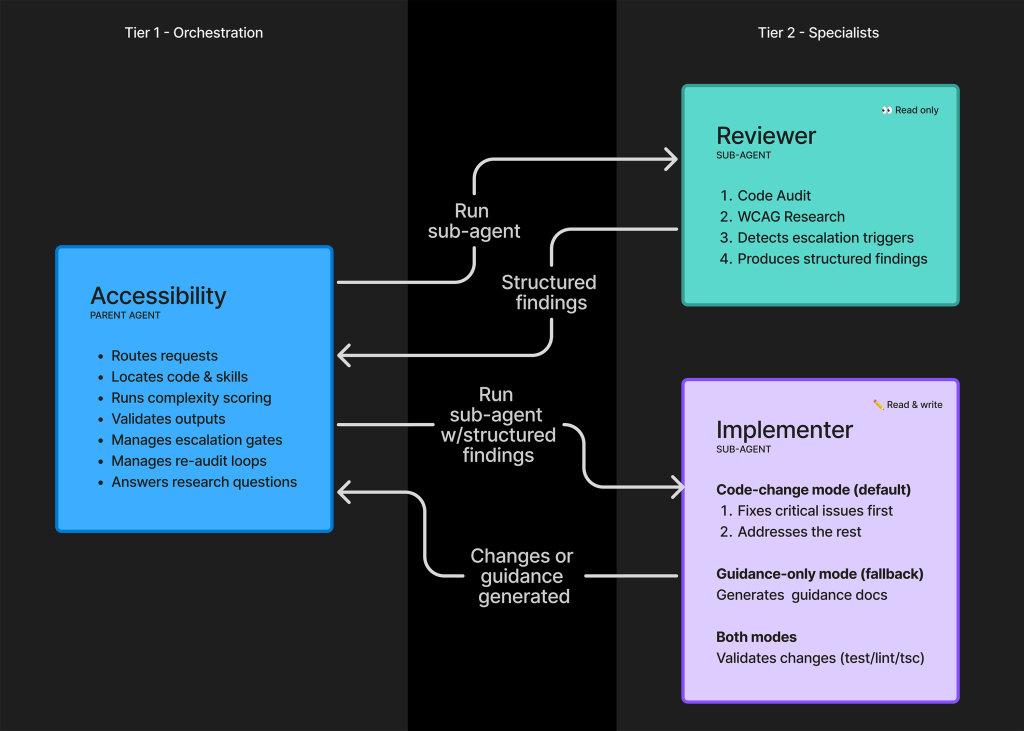
Surprisingly, this approach worked against us for the accessibility agent. Instead, we wound up using two dedicated sub-agents:
The two sub-agents are sandboxed and cannot directly pass content to each other. Instead, they generate a structured, templatized output. This output is then served to the parent orchestrating accessibility agent to consume, validate, and route.
There are a few reasons for this approach:
In addition to being a holistic concern, effective digital accessibility work also demands a methodical, detail-oriented approach.
The concern of using sub-agents to increase the speed of the LLM’s reply is counterbalanced by our need for its results to be accurate. We found that compelling the agent to execute its sub-agent instructions in a fixed order was key.
We first establish a parent set of ordered phases. Each phase itself contains child ordered steps of instructions, which are accompanied by relevant resources and skills:
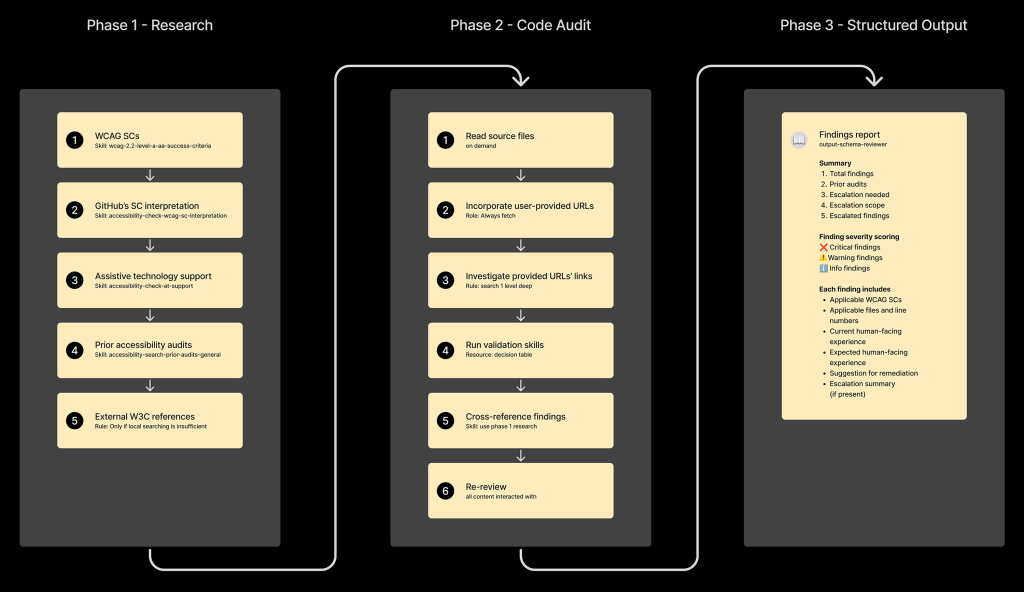
The interesting bit about this linear order is that it mirrors how I would personally approach performing auditing, remediating, and reporting duties.
The entire operation of the sandboxed sub-agents is built around template schema files. These files create consistency that is vital to keeping the agent focused and on track.
The two schema templates are:
Without the schema files in place, the agents would all attempt to arbitrarily communicate with each other. This would create increased token expenditure, undesirable hallucinations, unnecessary code changes, and difficult-to-impossible behavior for agent auditing purposes.
Another vital aspect of creating the accessibility agent is understanding areas where agents can fall short.
As the agent is not a turnkey “solution” for accessibility, we want to avoid situations where the agent’s output in error may not be sufficiently interrogated by the human using it. This is especially relevant when someone is not well-versed in digital accessibility considerations and practices.
Here’s what we did to accommodate the agent’s limitations:
We want to avoid scenarios where we would need to perform costly and time-intensive work to revisit an inaccessible solution that the agent “thinks” is accessible.
To aid with this problem, the accessibility agent uses a small shell script to analyze the code it is set to work on. The script itself is simple, using a small set of basic heuristics to evaluate the relative complexity and distill it down into a score.
This score is then ingested by the agent. If the score passes a set threshold, the agent is instructed to not execute code changes. Instead, it will inform the person using the LLM that they should reach out to the accessibility team to consult on what they are attempting to do.
It is a subtle thing to understand, but know that it is entirely possible to have code that passes automated accessibility checks, yet is functionally unusable.
As a companion to code complexity, the accessibility agent is instructed to avoid attempting code generation for patterns the accessibility team has identified as high-risk. This includes, but is not limited to: drag and drop, toasts, rich text editors, tree views, and data grids.
These patterns require a ton of focused attention and detail and currently sit outside of an LLM’s current capabilities to produce in a way that actually works with assistive technology.
Not prohibiting high-risk patterns and high-complexity code environments would lead to unnecessary demands of everyone’s time to readdress, and also represents reputational risk for the accessibility team. We avoid this by shutting off the LLMs capability to go down this pathway.
I am loathe to anthropomorphize LLMs, but one quality they all seem to share is desperately wanting to produce content. For Copilot, that often means generating code.
We had to create anti-gaming instructions to prevent the LLM from creating sneaky ways to get around its instructions to not generate code when human expertise is needed. This prevented it from violating its own intervention instructions.
Agent success metrics live within a larger context.
Of the 55 total WCAG level A and AA Success Criterion, only 35 of them can be detected via deterministic automated code checkers. This means that ~36% of level A and AA Success Criterion cannot be discovered automatically.
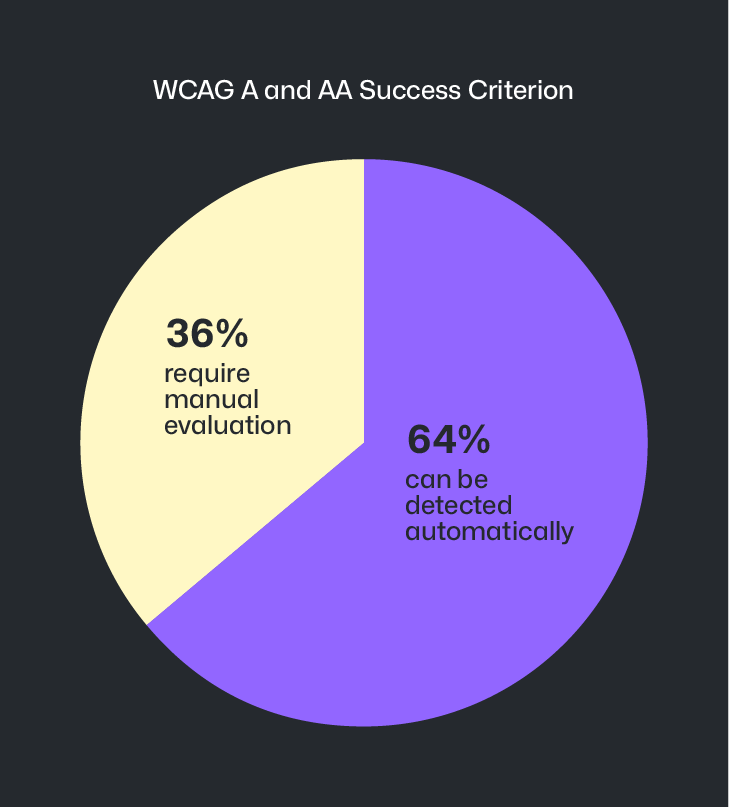
LLM-powered agent operation is making inroads on this ~36% gap, but it is not a perfect science. Because of this, it becomes important to manually identify accessibility barriers earlier during design and prototyping efforts—the area where the majority of accessibility issues originate.
This thinking is also reflected in the agent’s escalation logic, in that members of the Accessibility team can pair with designers to help consider alternate approaches and brainstorm solutions that achieve business goals without compromising on accessibility.
This intervention and assistance is done to thwart potential downstream issues—and costly and time-consuming redesigns—are stopped before they ever have a chance to get off the ground.
We periodically perform manual review of agent output to determine its accuracy and efficacy. In addition, we have tooling in place to capture pull request reviewer sentiment. Both serve as strong signals for areas where the agent needs better instruction, as well as new resources and skills.
To recap, we learned that the agent is:
This journey is also not yet complete. The accessibility agent continues to be iterated upon in the hopes of helping ensure GitHub is an accessible and inclusive platform for all developers.
We hope that we can eventually open source the agent as part of our pledge to help improve the accessibility of open source software at scale. Until then, we hope that in sharing our learnings with this undertaking that other teams can have a resource to reference for their own accessibility efforts.
The post Building a general-purpose accessibility agent—and what we learned in the process appeared first on The GitHub Blog.
Continue reading on the original blog to support the author
Read full articleThis article highlights a shift from chat-centric AI to task-oriented interfaces. For engineers, this means better productivity through custom tools that reduce token costs and provide precise control over local environments and data without leaving the AI workspace.
Engineers often get distracted by AI gimmicks. This article highlights that productivity gains come from understanding the core agent harness and granting it autonomy in safe, sandboxed environments, allowing for faster prototyping and fewer manual interruptions.
This app shifts AI from a simple chat interface to a comprehensive workspace. By integrating context-aware agents, interactive UI previews, and automated PR management, it streamlines the entire development lifecycle from initial coding to final merge.
Accessibility is shifting from a compliance task to a core engineering discipline. By integrating it into CLIs, design systems, and AI, GitHub shows how to build inclusive tools that empower developers with disabilities and improve the user experience for everyone.
