This architecture demonstrates how to scale AI agent capabilities securely in an enterprise environment. By standardizing tool access via MCP and a central registry, Pinterest enables safe, automated engineering workflows while maintaining strict governance and security controls.
Tan Wang | Software Engineer, Agent Foundations

Over the last year, Pinterest has gone from “MCP sounds interesting” to running a growing ecosystem of Model Context Protocol (MCP) servers, a central registry, and production integrations in our IDEs, internal chat surfaces, and AI agents. This post walks through what we’ve built so far, how we designed it, and where we’re taking MCP next.
Model Context Protocol (MCP) is an open-source standard that lets large language models talk to tools and data sources over a unified client-server protocol, instead of bespoke, one-off integrations for every model and every tool. At Pinterest, we’re using MCP as the substrate for AI agents that can safely automate engineering tasks, not just answer questions. That includes everything from “read some logs and tell me what’s wrong” to “look into a bug ticket and propose a fix PR.”
Although MCP supports local servers (running on your laptop or personal cloud development box, communicating over stdio), we explicitly optimized for internal cloud-hosted MCP servers, where our internal routing and security logic can best be applied.
Local MCP servers are still possible for experimentation, but the paved path is “write a server, deploy it to our cloud compute environment, list it in the registry.”
We debated a single monolithic MCP server vs. multiple domain-specific servers. We chose the latter: multiple MCP servers (e.g., Presto, Spark, Airflow) each own a small, coherent set of tools. This lets us apply different access controls per server and avoid crowding the model’s context.
A common piece of feedback we received early on was that spinning up a new MCP server required too much work: deployment pipelines, service configuration, and operational setup before writing any business logic. To address this, we created a unified deployment pipeline that handles infrastructure for all MCP servers: teams define their tools and the platform handles deployment and scaling of their service. This lets domain experts focus on their business logic rather than figuring out deployment mechanics.
The MCP registry is the source of truth for which MCP servers are approved and how to connect to them. It serves two audiences. The web UI lets humans discover servers, the owning team, corresponding support channels, and security posture. The Web UI also shows the MCP server’s live status and visible tools. The API lets AI clients (e.g., our internal AI chat platform, AI agents on our internal communications platform, IDE integrations) discover and validate servers, and lets internal services ask “Is this user allowed to use server X?” before letting an agent call into it.
This is also the backbone for governance: only servers registered here count as “approved for use in production.”
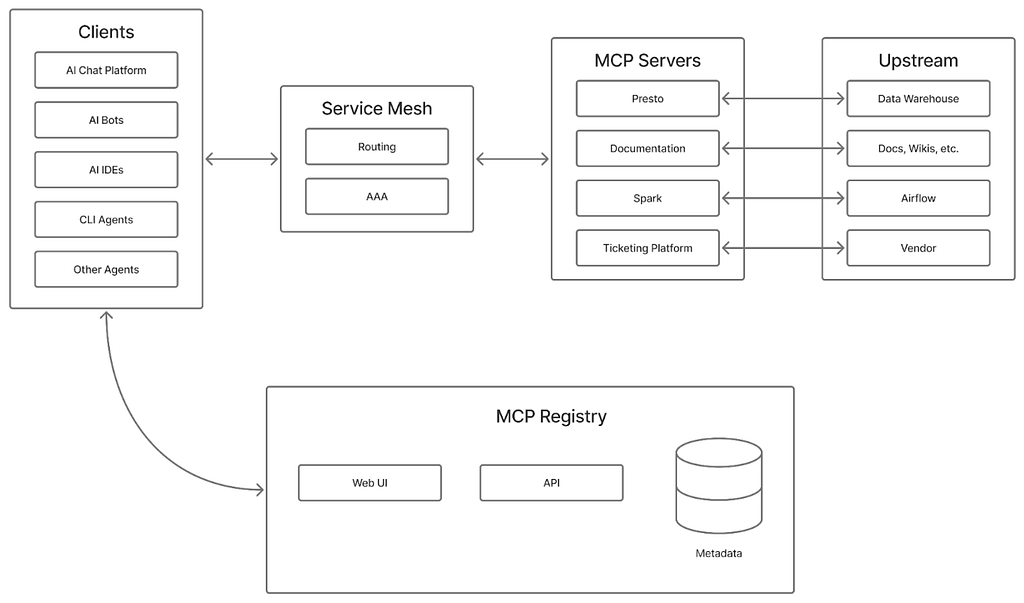
We started by seeding a small set of high-leverage MCP servers that solved real pain points, then let other teams build on top of that.
Representative examples (by usage):
We didn’t want MCP to be a science project; it had to show up where engineers already work.
Our internal LLM web chat interface is used by the majority of Pinterest employees daily. The frontend automatically performs OAuth flows where required, and returns a list of usable tools for the current user, scoped to respect security policies. Once connected, our AI chat agent binds MCP tools directly into its agent toolset so invoking MCP feels no different from calling any other tool.
We also have AI bots embedded in our internal chat platform, which also exposes MCP tools. Like our LLM web chat interface, it handles authentication and authorization through the registry API. It also supports functionality such as restricting certain MCP tools to certain communication channels (for example, Spark MCP tools are only available in Airflow support channels).
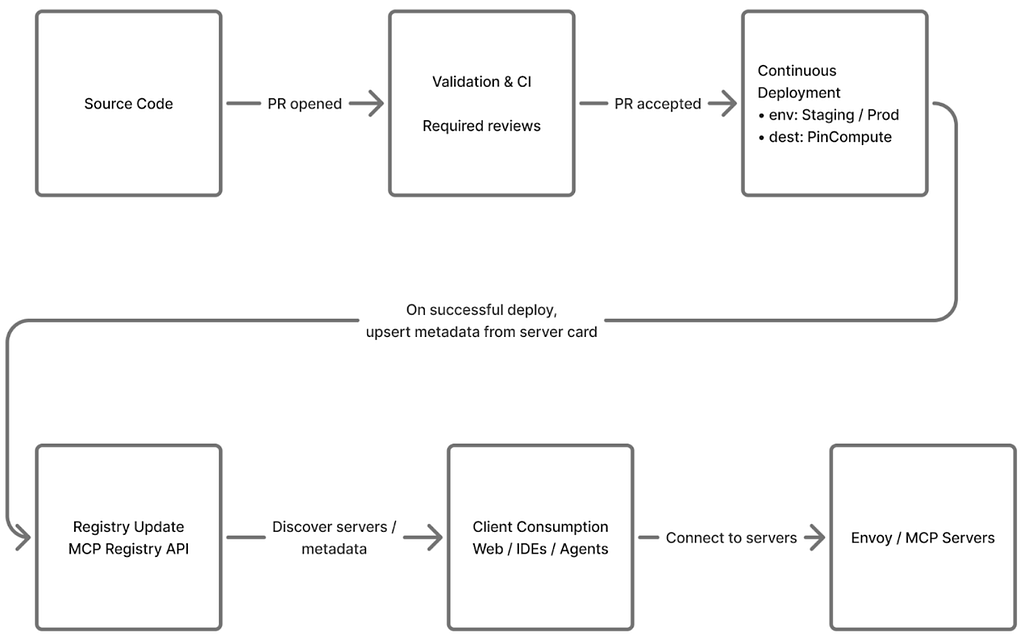
An overview of the flow from starting to build an MCP server to when it’s consumed by an end user:
Letting AI agents call tools that touch real systems and data raises obvious security questions. We’ve treated MCP as a joint project with Security from day one.
We defined a dedicated MCP Security Standard. Every MCP server that is not a one-off experiment must be tied to an owning team, appear in the internal MCP registry, and go through review, yielding Security, Legal/Privacy, and (where applicable) GenAI review tickets that must be approved before production use. This set of reviews determines the security policies that are put in place around the MCP server, such as which user groups to limit access of the server to.
At runtime, almost every MCP call is governed by two layers of auth: end-user JWTs and mesh identities.
End-user flow (JWT-based)
Note that since some MCP servers can execute queries against sensitive internal data systems (like the Presto MCP server), we implemented business-group-based access gating. Rather than granting access to all authenticated Pinterest employees and contractors, some servers will:
At Pinterest, this means that even though the Presto MCP server is technically reachable from broad surfaces like our LLM web chat interface, only a specific set of approved business groups (for example, Ads, Finance, or specific infra teams) can establish a session and run the higher-privilege tools. Turning on a powerful, data-heavy MCP server in a popular surface therefore doesn’t silently expand who can see sensitive data.
Some servers require a valid JWT even for tool discovery. That gives us user-level attribution for every invocation and a clean way to reason about “who did what” when we look at logs.
Service-only flows (SPIFFE-based)
For low-risk, read-only scenarios, we can rely on SPIFFE-based auth (mesh identity only). Our internal service mesh still enforces security policies, but the server authorizes based on the calling service’s mesh identity instead of a human JWT. We reserve this pattern for cases where there’s no end user in the loop and the blast radius is tightly constrained.
Contrast with the MCP OAuth Standard
The MCP specification defines an OAuth 2.0 authorization flow where users explicitly authenticate with each MCP server, typically involving consent screens and per-server token management. Our approach is different: users already authenticate against our internal auth stack when they open a surface like the AI chat interface, so we piggyback on that existing session. There is no additional login prompt or consent dialog when a user invokes an MCP tool. Envoy and our policy decorators handle authorization transparently in the background, giving us fine-grained control over who can call which tools without surfacing the complexity of per-server authorization flows to the end user.
Because MCP servers enable automated actions, the blast radius is larger than if a human manually wielded these tools. Our agent guidance therefore mandates human-in-the-loop before any sensitive or expensive action: agents propose actions using MCP tools, and humans approve or reject (optionally in batches) before execution. We also use elicitation to confirm dangerous actions. In practice, this looks like our AI agents asking for confirmation before applying a change to e.g. overwrite data in a table.
We didn’t want MCP to become a black box. From the start, we designed it to be measured and observable. All MCP servers at Pinterest use a set of library functions that provide logging for inputs/outputs, invocation counts, exception tracing, and other telemetry for impact analysis out of the box. At the ecosystem level, we measure the number of MCP servers and tools registered, the number of invocations across all servers, and the estimated time-savings per invocation provided as metadata by server owners.
These roll up into a single north-star metric: time saved. For each tool, owners provide a directional “minutes saved per invocation” estimate (based on lightweight user feedback and comparison to the prior manual workflow). Combined with invocation counts, we get an order-of-magnitude view of impact, which we treat as a directional signal of value. As of January 2025, MCP servers have ramped up to 66,000 invocations per month across 844 monthly active users. Using these estimates, MCP tools are saving on the order of 7,000 hours per month.
In the past year, Pinterest has successfully transitioned from an initial concept to a robust, production-ready ecosystem for the Model Context Protocol (MCP). By explicitly choosing an architecture of internal cloud-hosted, multiple domain-specific MCP servers connected via a central registry, we have built a flexible and secure substrate for AI agents. These high-leverage tools are integrated directly into employees’ daily workflows, meeting them where they work.
Crucially, this entire system was built with a security-first mindset. Our two-layer authorization model using end-user JWTs and mesh identities, combined with a dedicated MCP Security Standard and business-group-based access gating on sensitive servers like Presto, ensures that powerful AI agents operate with the principles of least privilege and full auditability.
The results are clear: the MCP ecosystem has already grown to over 66,000 invocations per month, delivering an estimated 7,000 hours of time saved monthly for our engineers. This success confirms the value of using an open-source standard to unify tool access for AI.
Looking ahead, we will continue to expand the fleet of MCP servers, deepen integrations across more engineering surfaces, and refine our governance models as we empower more AI agents to safely automate complex engineering tasks, further boosting developer productivity at Pinterest.
This AI-enabled MCP ecosystem would not have been possible without:
Building an MCP Ecosystem at Pinterest was originally published in Pinterest Engineering Blog on Medium, where people are continuing the conversation by highlighting and responding to this story.
Continue reading on the original blog to support the author
Read full articleThis system provides real-time, statistically robust insights into content safety, enabling platforms to proactively identify and mitigate harms. It's crucial for maintaining user trust and scaling content moderation efficiently with AI.
This approach shows how to collapse complex multi-stage recommendation pipelines into a single generative task. It proves that distilled 4B-parameter LLMs can provide production-grade performance for high-scale personalization, significantly improving user intent understanding and engagement.
Standard retrieval models often collapse diverse user interests into a single vector. This architecture demonstrates how to scale multi-intent retrieval using transformers and GPU-optimized batching, significantly improving relevance and engagement in massive-scale recommendation systems.
Standard recommendation systems often over-optimize for immediate clicks, leading to user churn. By modeling the lifecycle of specific interests (UICs), engineers can build systems that prioritize long-term retention and discovery, ensuring platforms remain relevant as user needs evolve.
