This demonstrates how AI-assisted development and specialized SDKs can drastically reduce the time needed to build functional internal tools. It highlights the shift from manual coding to high-level planning and architectural review using modern LLMs.
Every week, the GitHub team runs a stream called Rubber Duck Thursdays, where we build projects live, cowork with our community, and answer questions!
This week, we built a very fun project together using the GitHub Copilot CLI! Let me tell you about it.
💡 New to GitHub Copilot CLI? Here’s how to get started.
In a lot of social media tweets and launches, you often see accounts post things like:
We shipped the most amazing emoji list generator ever. It:

💻 Works in the CLI
🤖 Uses the Copilot SDK to intelligently convert your bullet points to relevent emoji
📋 Copies the result to the clipboard
It’s beautiful. But coming up with the perfect emoji is far too slow for me in this “move fast and break things” world. I have projects to build! Repos to vibe! Pull requests to merge! I can’t be thinking about emojis!
And thus, on the stream, we build an emoji list generator (very descriptively called Emoji List Generator) that:
🖥️ Runs in the terminal
📋 You paste or write a list
⌨️ You hit Ctrl + S
📎 You get the list on your clipboard
(Can you tell I’m dogfooding the product here?)
We used a few cool technologies for this project:
🖥️ @opentui/corefor the terminal UI
🤖 @github/copilot-sdkfor the AI brain
📋 clipboardyfor clipboard access
To start the project off, we opened up the GitHub Copilot CLI.
In plan mode using Claude Sonnet 4.6, we wrote:
I want to create an AI-powered markdown emoji list generator. Where, in this CLI app, if I paste in or write in some bullet points, it will replace those bullet points with relevant emojis to the given point in that list, and copies it to my clipboard. I'd like it to use GitHub Copilot SDK for the AI juiciness.Copilot asked me a bunch of clarifying questions, for example around the tech stack and what libraries we should use (shoutout to Gabor in the chat for suggesting OpenTUI), and from there, we had a fully thought-out plan.mdfile for me to review and use!
We implemented the plan using Claude Opus 4.7 (which was recently released!) and a few minutes later, voilà, we had a fun little terminal UI to work with!
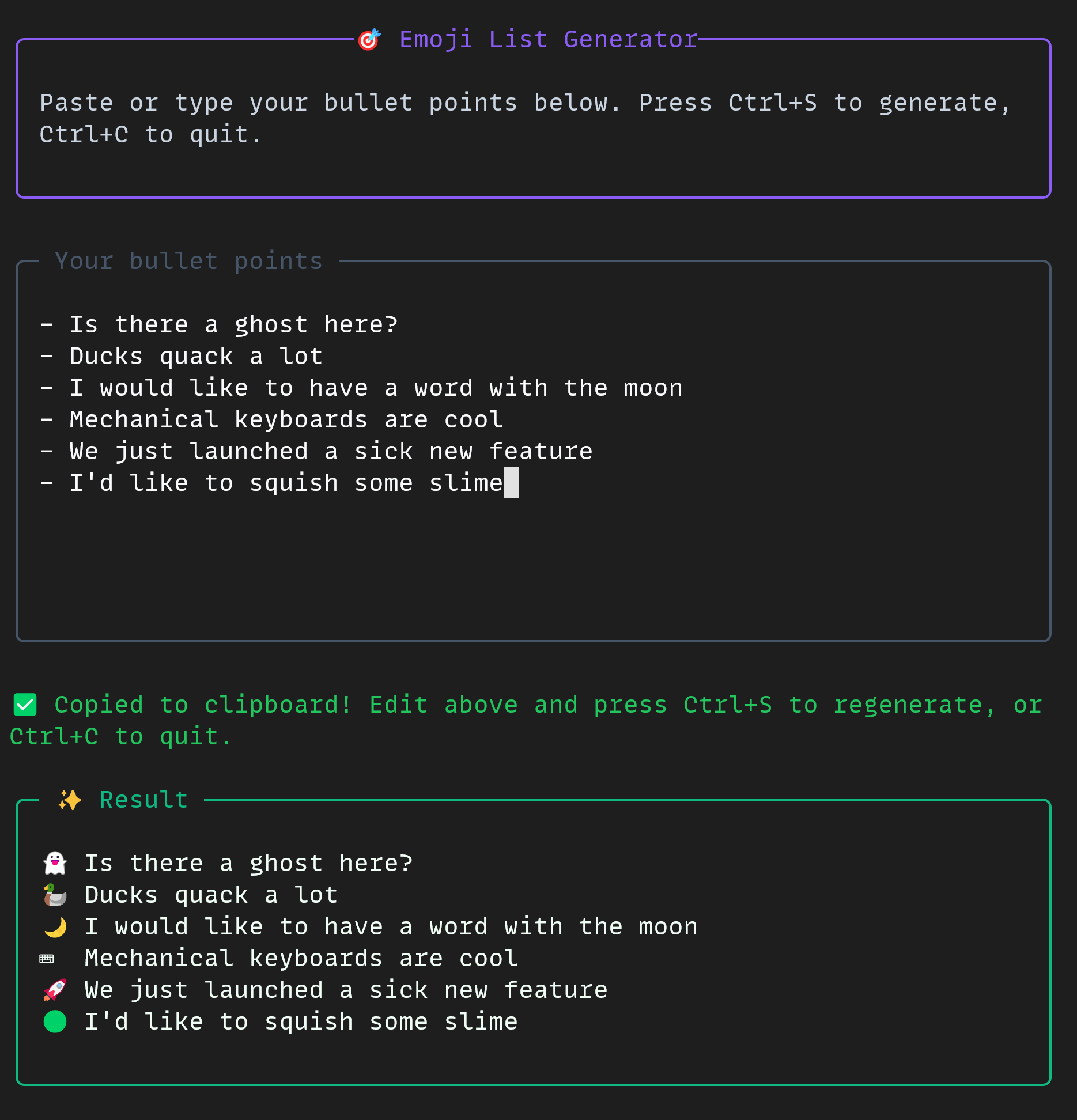
The project was small but mighty. In the CLI, we used some really cool tools all together:
📋 Plan mode
🤖 Autopilot mode
🔀 Multi-model workflow
🚩 The allow-alltools flag
🐙 The GitHub MCP server
If you’d like to build a project like this yourself, you can check out the docs for the GitHub Copilot CLI and the GitHub Copilot SDK today!
The emoji list generator is free and open source, just for you.
Happy building!
The post Building an emoji list generator with the GitHub Copilot CLI appeared first on The GitHub Blog.
Continue reading on the original blog to support the author
Read full articleParallel agent sessions boost productivity by automating multiple tasks simultaneously. Using Git worktrees for isolation, engineers can handle features, reviews, and tests in parallel without manual context switching or environment conflicts.
As AI shifts from chat interfaces to autonomous agents, developers must master new architectural patterns like loop engineering and harnesses. Understanding these terms helps teams build reliable AI-native systems while managing costs and performance.
This article highlights the shift in open-source maintenance caused by AI. It explores how to manage high-volume, AI-generated contributions while maintaining security and community trust, offering a blueprint for future projects in the age of automated development.
This article explains how to use the GitHub Copilot app's 'My work' pane to streamline task management. By centralizing issues and PRs and linking them directly to AI agent sessions, engineers can reduce context switching and improve productivity when handling complex development workflows.
