This article demonstrates how to automate the challenging process of migrating and scaling stateful Hadoop clusters, significantly reducing manual effort and operational risk. It offers a blueprint for managing large-scale distributed data infrastructure efficiently.
Joe Sabolefski, Sr. Site Reliability Engineer


Much of Pinterest’s big data is processed using frameworks like MapReduce™, Spark™, and Flink™ on Hadoop™ YARN™. The processing is carried out on many thousands of nodes spread across over a dozen clusters. We use AWS for our infrastructure, and each cluster uses Auto Scaling Groups (ASGs) to maintain cluster size. Because Hadoop is stateful, we do not auto-scale the clusters; each ASG is fixed in size (desired = min = max). Terraform is utilized to create each cluster. Before introducing the Hadoop Control Center (HCC), Terraform was also used to scale out the Auto Scaling Groups (ASGs). However, scaling in (downsizing) is a more complex process that requires several manual steps. We aimed to perform as many cluster operations automatically as possible 24/7 with minimal user intervention and no impact on workloads.
It may seem easier to configure and launch a new cluster with desired migration features, such as AMI (latest OS/Kernel) and instance type, but that’s not always the case. This method can work for small clusters and was used prior to HCC. However, with some of our clusters having over 3k+ nodes, using that method may not be feasible. We faced several major issues and concerns:
As part of our migration strategy, we opted to perform an in-place migration by introducing a new ASG to the cluster. The new ASG had the desired configuration, which included the latest AMI (OS/Kernel) and a new instance type.
Once the new ASG is up and running, we can start reducing the number of nodes in the cluster, known as “scale-in.” On the other hand, scaling-out, which involves adding more nodes to the cluster, is as simple as modifying the ASG size values in the Terraform configuration and applying the change. However, scaling-in can be more challenging and can potentially impact running applications or the scratch data on the Hadoop™ File System (HDFS). To simplify the scaling-in process and ensure data replication, we utilized the Hadoop Control Center (HCC) tool to replicate HDFS data to new nodes before decommissioning the old nodes.
This process is tedious, time consuming, and it is easy to make mistakes.
HCC was designed with the aim of streamlining the scaling process and serving as a comprehensive platform for all Hadoop-related tasks, thereby easing the cluster administration workload. In addition to Hadoop-related tools, HCC also integrates other useful tools that facilitate cluster management. Examples include:
In this blog post, we focus on the scaling feature, which is the first and most complex one.
The HCC CLI interface allows users to easily specify the desired ASG size, and the tool handles the rest. For example:
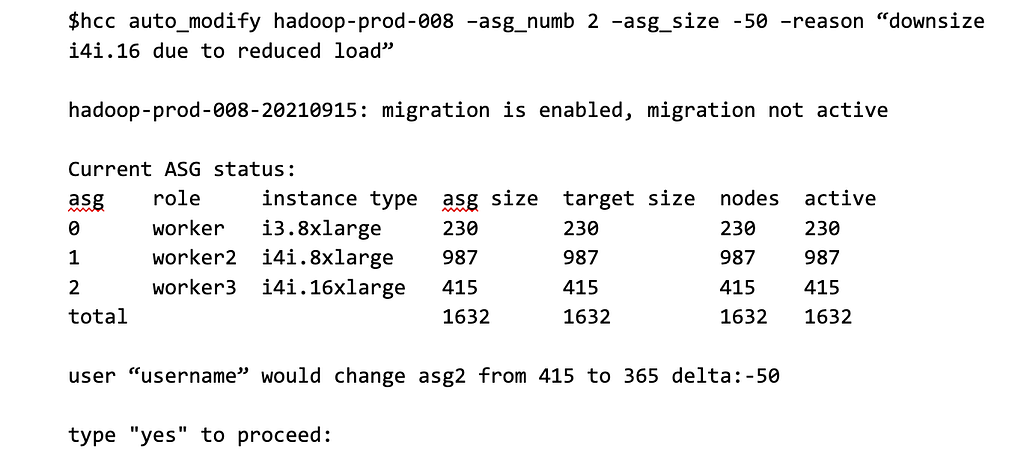
Column explanations for the above status:
Note that both relative (-50) and absolute scaling is supported by HCC. In the case of a scale-out operation, HCC updates the ASG size directly via AWS(™) API.
At times, we may come across situations where we need to manage additional workload and require a temporary increase in capacity. To address this, we have a “backfill” flag that allows operators to add capacity temporarily without having to worry about the overall cluster size. This means that the size of the main ASG remains unaffected and can be changed independently of the added backfill capacity. As a result, the user need not be concerned about the original cluster size and can remove the backfill nodes when required.
The tricky part, as noted earlier, is the scale-in and the reason HCC was created.
HCC consists of one main manager node and several worker nodes. The manager acts as an intermediary and cache, as well as handles all API calls. Each Virtual Private Cloud (VPC) has one HCC worker node, which manages all of the clusters in that VPC. When a worker node starts up, it retrieves a list of clusters in its VPC from CMDB that it will manage.
The Hadoop Manager Class (HMC) implements the HCC functionality, and one instance of the HMC is created for each cluster. The HMC facilitates all interactions with the cluster nodes, AWS(™) API calls, and manages three automation threads. Each worker node connects to the manager node and periodically updates the status of the cluster. If an API call is a read request, it is satisfied from the manager’s cache. Otherwise, if it requires an action, like resizing ASGs, the command is forwarded to the appropriate worker for that cluster.
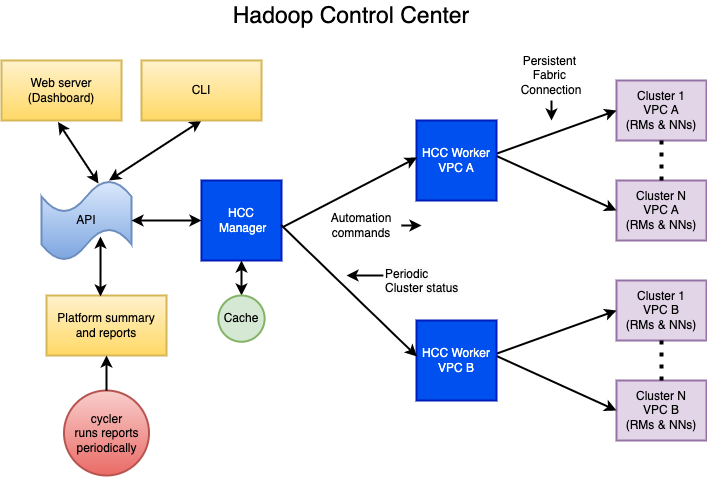
The core of HCC is the Hadoop Operations Server (HOS), which is based around the Hadoop Manager Class (HMC). The HMC does all of the heavy lifting, updating JMX cache, maintaining fabric connections to all Hadoop manager nodes (Resourcemanagers and Namenodes), updating excludes files and refreshing, maintaining which RM & NN is active, etc. HCC periodically queries and consolidates JMX data from Namenodes (NN), Resource Managers (RM), and our Configuration Management Database (CMDB) into one structure (CMDB is our database of metadata for ec2 instances). HCC uses the consolidated data to make decisions about what to do. Only instances that are fully in service are considered. For example, if there are 200 instances in an ASG with 150 in service and the target size is 125, only 25 will be selected to be decommissioned. HCC will not cause the ASG to have the active count to go below the desired target size.
HCC manages the process through three threads and three queues. If HCC sees that the target size is less than the current size, then it will choose “n” instances to decommission. Instances are chosen based on those with the least number of containers running. Each instance is represented by an object with tags such as disposition, submit_time, reason etc. The disposition will be to migrate, terminate or reboot. For ASG scale-in the disposition is set to migrate; this tells the drained thread to downsize the ASG upon termination. If the disposition is set to terminate then the only operation will be to terminate the instance and we let the ASG add back a replacement node. This is for ad-hoc terminations (e.g., a user suspects a bad node, or there is an AWS(™) event). The same is true for the reboot disposition, except instead of terminating the instance, it is just rebooted.
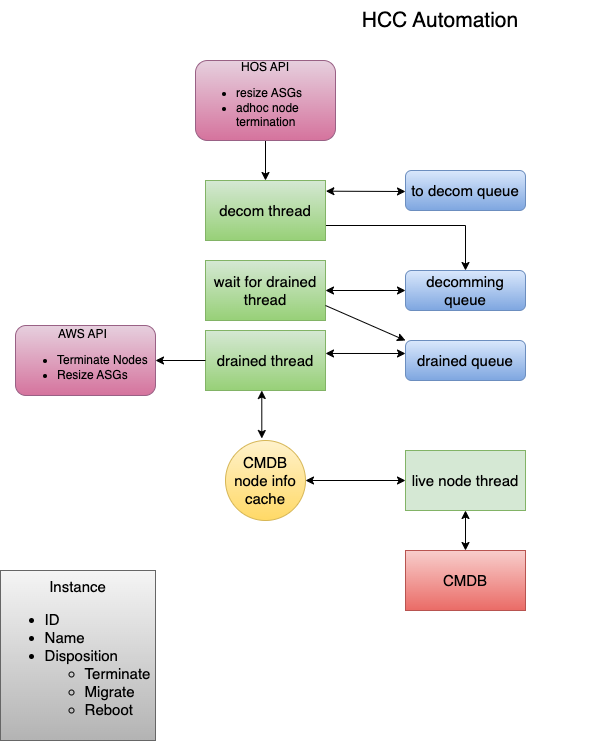
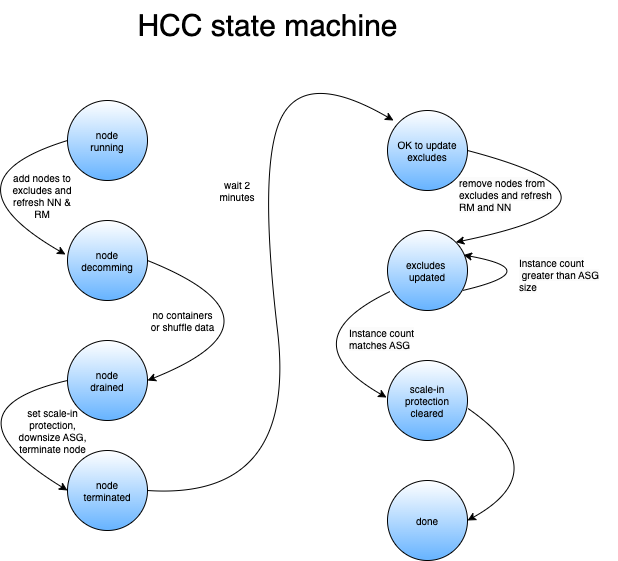
Once an instance object is in a queue, it progresses through until it reaches the decommissioned queue. Nodes are dequeued from the “to_decom” queue in batches (configurable, nominally 15). Each batch is set to decommission state (see below), then under replicated blocks are monitored until they reach zero (once nodes are decommissioned on the Namenode, under replicated blocks immediately goes up by the number of blocks on each node being decommissioned).
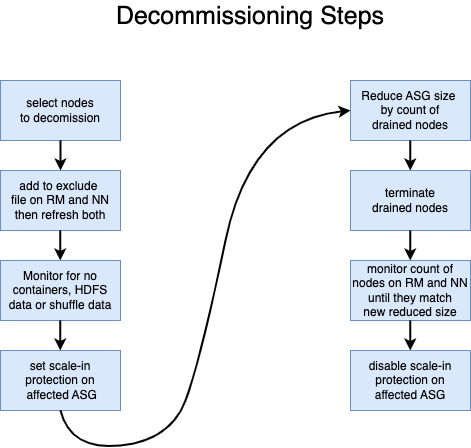
For nodes with migrate, HCC will wait until a configured minimum number is in this state, typically 10 (or all of them if there are no remaining nodes in any other queues). Then it will wait five minutes from the time the last node was added so that it can batch as many as possible. When no more nodes are added in five minutes, then the process outlined earlier is started:
To ensure that the termination process can begin without any data loss, we have deferred the removal of certain nodes from the hosts exclude files. It was discovered that if these nodes are removed too early, the NN will re-enable them, and they will start receiving HDFS data. To avoid this issue, we wait for at least a minute before removing the nodes. This delay ensures that the data is not lost when the node is eventually terminated. Despite having a replication factor of 3, data loss can still occur if we don’t delay, as the batch size is typically greater than 3.
The number of actual active instances has to be monitored and compared to the new ASG size before disabling scale-in protection. Otherwise, the AWS(™) ASG terminate process will determine it has too many instances and will select and terminate enough nodes to bring the count down to the specified size. This invariably results in killed containers and HDFS data loss. The goal of HCC is to never kill a container or lose a single HDFS block.
As mentioned earlier, if you reduce the size of an ASG, the AWS(™) scale-in process will just pick some random nodes to terminate to bring the size down. The only way to choose which instances get terminated is to prevent the AWS(™) scale-in from happening and terminate the nodes yourself. There are two ways to do this:
Suspending the AWS(™) ASG scale-in process is much easier and would work except for one thing: users still have to run Terraform (like to replace manager nodes). When Terraform is run, it re-enables the scale-in process. That’s just the way our Terraform configs are set up. HCC avoids this by managing scale-in protection of each instance within the ASG.
Terraform is used for managing our clusters, including ASG sizes (before HCC). Prior to HCC, we had to modify Terraform code, then apply and commit the code. We do monthly evaluations of cluster sizes which often results in several size changes. The process to do this with Terraform is tedious, and sometimes code does not get checked, causing configuration mismatch the next time that cluster is changed.
HCC avoids the need for Terraform for ASG size changes by directly changing the ASG configuration via the AWS(™) API. Terraform is still needed for manager replacement and launch template changes (e.g. AMI change, instance type change). To avoid conflicts in this case we’ve replaced the hard-coded values for ASG sizes with references to external variables in the Terraform.tfvars file. The user simply runs an HCC update command which looks at the current directory, extracts the cluster name, queries AWS(™) directly for all ASGs of that cluster, then populates the file with actual current values. This way a Terraform plan will never show a conflict for ASG sizes. HCC also logs the changes to a separate file so looking at historical changes is much easier than pawing through git log output.
Some other features that might be added to HCC going forward:
Automated Migration and Scaling of Hadoop™ Clusters was originally published in Pinterest Engineering Blog on Medium, where people are continuing the conversation by highlighting and responding to this story.
Continue reading on the original blog to support the author
Read full articleManaging schema drift in distributed CDC pipelines is error-prone and causes downtime. Pinterest's framework automates propagation across Flink, Spark, and Iceberg, ensuring data consistency and pipeline reliability while reducing manual intervention through a PR-based, auditable workflow.
This article demonstrates how to overcome legacy observability challenges by pragmatically integrating AI agents and context engineering, offering a blueprint for unifying fragmented data without costly overhauls.
This article details Pinterest's approach to building a scalable data processing platform on EKS, covering deployment and critical logging infrastructure. It offers insights into managing large-scale data systems and ensuring observability in cloud-native environments.
This article details Pinterest's strategic move from Hadoop to Kubernetes for data processing at scale. It offers valuable insights into the challenges and benefits of modernizing big data infrastructure, providing a blueprint for other organizations facing similar migration decisions.
