Automating performance metrics lowers the barrier for product teams to prioritize speed. By making Visually Complete latency a default feature, engineers can focus on optimization rather than instrumentation, ensuring a consistently fast user experience across all app surfaces.
Author: Lin Wang (Android Performance Engineer)

For mobile apps, performance is considered as the “default feature”, which means apps are expected to run fast and be responsive. It’s just as if we expect a watch to show the time. With no exceptions at Pinterest, we measure, protect and improve performance for all of our key user experiences’ surfaces, such as “Home Feed” and “Search Result Feed”.
Among all the performance metrics, the user perceived latency is a crucial one. It measures how much time the user spends since they perform an action until they see the content. This is also called “Visually Complete”.
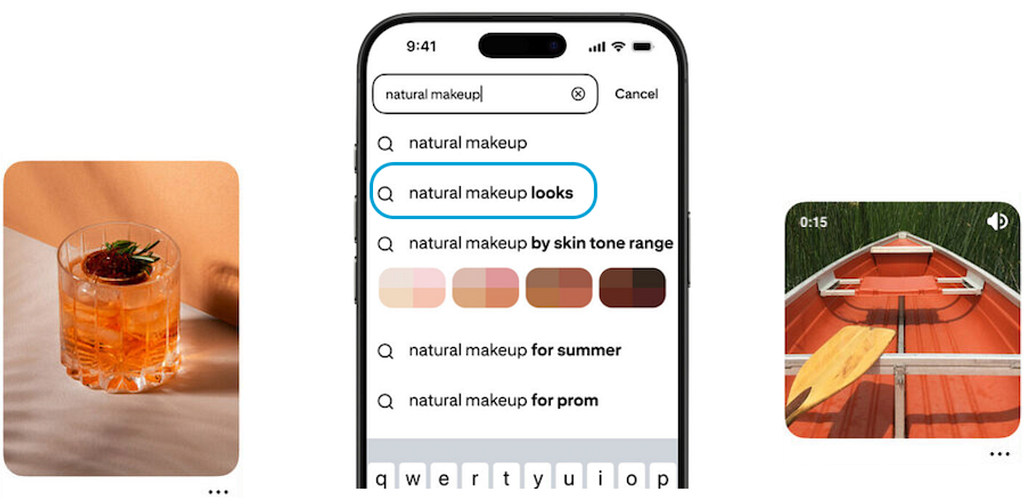
Visually Complete can be very different from app to app or even from surface to surface within one app. On Pinterest’s “Video Pin Closeup” surface, Visually Complete means the full-screen video starts playing; on our “Home Feed” surface, Visually Complete is defined as all the images rendered and videos playing; on our “Search Auto Complete Page”, Visually Complete refers to the search autocompleted suggestions’s text rendered along with the avatar images.
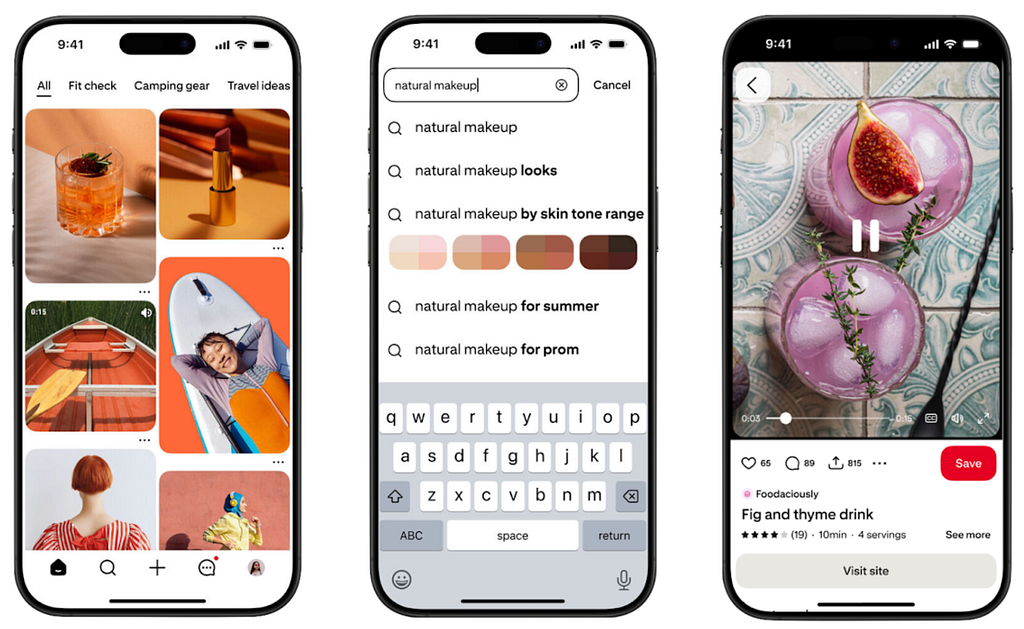
Given this dynamic nature of Visually Complete, engineers had to create customized measurement logic for each surface and that takes a lot of engineering effort and maintenance cost. This ends up as a major boundary for general product engineers to work on performance, especially on newly created surfaces. On average, it takes two engineer-weeks to implement a User Perceived Latency metric on the Android Client and wire it up to all the toolsets for production usage.
Over the years, the performance team at Pinterest has been thinking about how to offer performance measures with the lowest cost to product engineers. Therefore, more product engineers can more easily have access to their feature’s user perceived latency information and work on performance.
Until recently, it seems we have found an answer to this. In a nut shell, we built the Visually Complete logic into the base UI class (e.g. BaseSurface). Therefore, the Perceived Latency of any UI surface (existing or new) will be automatically measured as long as the feature is built on top of this base UI class.
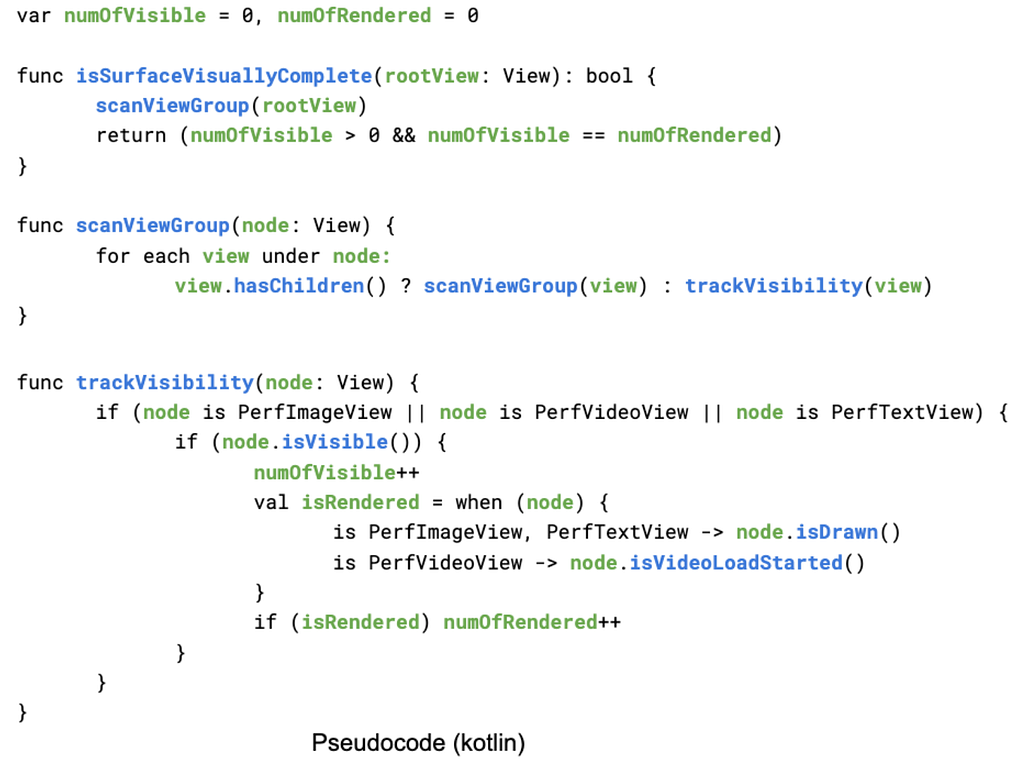
First we define a few common media view interfaces: PerfImageView, PerfTextView, PerfVideoView. Each of them contains a few methods to report their rendering status: isDrawn(), isVideoLoadStarted(), x(), y(), height(), width(), etc.
At the BaseSurface level, given that we should have access to the root android ViewGroup (e.g. RootView). We could just iterate through the view tree starting from the RootView by visiting all the views on this tree. We will focus on those visible views and judge if all the PerfImageView, PerfTextView and PerfVideoView instances are all drawn or started if it’s a video.
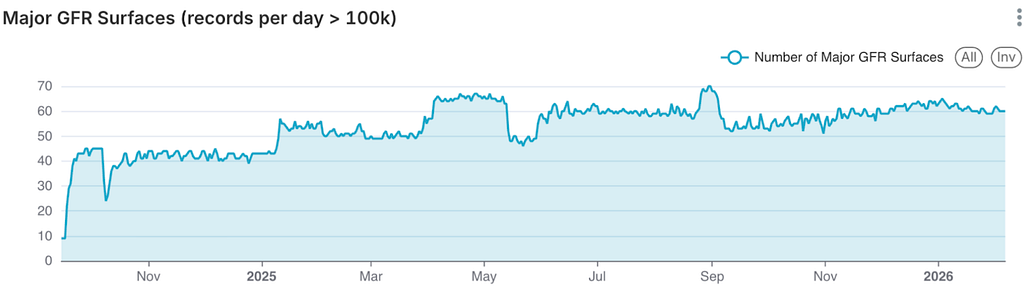
Since the release of this system on Android, it constantly visualizes the User Perceived Latency on over 60 surfaces at any given time. It is well received by many product teams and started to protect and improve their surface’s performance.
Once the performance metrics are offered to product engineers for free, it makes Pinterest’s performance more visible and encourages everyone to protect and optimize the User Perceived Latency on their surfaces.
Following the success on Android, we have also extended the same concept to iOS and web platforms.
Special thanks: Arun K
Performance for Everyone was originally published in Pinterest Engineering Blog on Medium, where people are continuing the conversation by highlighting and responding to this story.
Continue reading on the original blog to support the author
Read full articleAs AI agents handle more domain-specific tasks, their reliability becomes critical. This guide offers an empirical framework to move beyond 'vibes-based' AI development, providing a repeatable process to test and optimize how agents apply internal architectural knowledge.
This article demonstrates how investing in in-house test infrastructure and smart sharding can drastically improve CI/CD efficiency and developer velocity by reducing build times and flakiness. It highlights the benefits of taking control over critical testing environments.
Serving VLMs at scale requires overcoming massive compute and memory bottlenecks not found in text-only LLMs. This architecture demonstrates how to optimize multimodal inference using disaggregated serving and specialized hardware to achieve better TCO and performance for visual discovery.
AI isn't just a tool; it's a fundamental shift in the engineering operating model. It empowers engineers to tackle previously impossible projects while requiring a transition from 'how to build' to 'what to build,' fundamentally changing career paths and management roles.
